



公司有个项目是使用实体刷卡的会员管理系统,并为其它系统如餐饮系统、美发厅管理系统等提供统一的会员注册与信息管理。暂定使用一维条形码卡。
一般来说,商品最常用的编码是EAN-13,而非商品(如图书馆会员卡,驾驶证条码等)一般使用39码。
39码 在线测试地址:http://xoyozo.net/Tools/Code39
EAN-13 在线测试地址:http://xoyozo.net/Tools/EAN-13
39码
39码比较简单,条码以“*”为起始符和终止符,见下图:

它所能表示的字符包括:0~9 的数字,大写 A~Z 的英文字母,「+」,「-」,「*」,「/」,「%」,「$」,「.」,以及空格符(Space)等,共44组编码。
39码表:“0”对应白色空位,“1”对应黑色线条。
| 字元 | 逻辑型态 | 字元 | 逻辑型态 |
|---|---|---|---|
| A | 110101001011 | N | 101011010011 |
| B | 101101001011 | O | 110101101001 |
| C | 110110100101 | P | 101101101001 |
| D | 101011001011 | Q | 101010110011 |
| E | 110101100101 | R | 110101011001 |
| F | 101101100101 | S | 101101011001 |
| G | 101010011011 | T | 101011011001 |
| H | 110101001101 | U | 110010101011 |
| I | 101101001101 | V | 100110101011 |
| J | 101011001101 | W | 110011010101 |
| K | 110101010011 | X | 100101101011 |
| L | 101101010011 | Y | 110010110101 |
| M | 110110101001 | Z | 100110110101 |
| 字元 | 逻辑型态 | 字元 | 逻辑型态 |
|---|---|---|---|
| 0 | 101001101101 | + | 100101001001 |
| 1 | 110100101011 | - | 100101011011 |
| 2 | 101100101011 | * | 100101101101 |
| 3 | 110110010101 | / | 100100101001 |
| 4 | 101001101011 | % | 101001001001 |
| 5 | 110100110101 | $ | 100100100101 |
| 6 | 101100110101 | . | 110010101101 |
| 7 | 101001011011 | 空白 | 100110101101 |
| 8 | 110100101101 | ||
| 9 | 101100101101 |
值得注意的是,39码生成的条形中,每个码之间有一个空位,经扫描枪测试,该空位与一个单位的线条宽度相等时,能确保被正确扫描。
代码见附件
EAN-13码
EAN-13码是由13位数字构成,其中最后一位为校验码:

| 左侧空白区 | 起始符 | 左侧数据符 | 中间分隔符 | 右侧数据符 | 校验符 | 终止符 | 右测空白区 |
| 9个模块 | 3个模块 | 42个模块 | 5个模块 | 35个模块 | 7个模块 | 3个模块 | 9个模块 |
校验码计算的步骤如下: 以 234235654652 为例:
| 数据码 | 校验码 | ||||||||||||
| 代码位置序号 | 13 | 12 | 11 | 10 | 9 | 8 | 7 | 6 | 5 | 4 | 3 | 2 | 1 |
| 数字码 | 2 | 3 | 4 | 2 | 3 | 5 | 6 | 5 | 4 | 6 | 5 | 2 | ? |
| 偶数位 | 3 | + | 2 | + | 5 | + | 5 | + | 6 | + | 2 | ||
| 奇数位 | 2 | + | 4 | + | 3 | + | 6 | + | 4 | + | 5 | ||
① 从序号2开始,将所有偶数位的数字代码求和,得出S1; S1=3+2+5+5+6+2=23
② 从序号3开始,将所有奇数位的数字求和,得出S2; S2=2+4+3+6+4+5=24
③ S3=S1*3+S2; S3=23*3+24=93
④ C=10-(S3的个位数),得到校验码C的值。并且当S3的个位数为0时,C=0。 C=10-3=7
EAN码的编码规则:
数字符 |
左侧数据符 | 右侧数据符 | |
| A | B | C | |
| 0 | 0001101 | 0100111 | 1110010 |
| 1 | 0011001 | 0110011 | 1100110 |
| 2 | 0010011 | 0011011 | 1101100 |
| 3 | 0111101 | 0100001 | 1000010 |
| 4 | 0100011 | 0011101 | 1011100 |
| 5 | 0110001 | 0111001 | 1001110 |
| 6 | 0101111 | 0000101 | 1010000 |
| 7 | 0111011 | 0010001 | 1000100 |
| 8 | 0110111 | 0001001 | 1001000 |
| 9 | 0001011 | 0010111 | 1110100 |
(关于左侧数据符,网络上的资料均显示A3及B6为6位数,经本人实践亲自查证,已修正)
起始符:101
中间分隔符:01010
终止符:101。
A、B、C中的“0”和“1”分别表示具有一个模块宽度的“空”和“条”。
因为左侧数据编码方式有两种,要按照前置码选其中一种,如表:
| 前置字符 | 左侧数据符编码规则的选择 | |||||
| 0 | A | A | A | A | A | A |
| 1 | A | A | B | A | B | B |
| 2 | A | A | B | B | A | B |
| 3 | A | A | B | B | B | A |
| 4 | A | B | A | A | B | B |
| 5 | A | B | B | A | A | B |
| 6(中国) | A | B | B | B | A | A |
| 7 | A | B | A | B | A | B |
| 8 | A | B | A | B | B | A |
| 9 | A | B | B | A | B | A |

我们继续讲解LINQ to SQL语句,这篇我们来讨论Group By/Having操作符和Exists/In/Any/All/Contains操作符。
Group By/Having操作符
适用场景:分组数据,为我们查找数据缩小范围。
说明:分配并返回对传入参数进行分组操作后的可枚举对象。分组;延迟
1.简单形式:
var q =
    from p in db.Products
    group p by p.CategoryID into g
    select g;
语句描述:使用Group By按CategoryID划分产品。
说明:from p in db.Products 表示从表中将产品对象取出来。group p by p.CategoryID into g表示对p按CategoryID字段归类。其结果命名为g,一旦重新命名,p的作用域就结束了,所以,最后select时,只能select g。当然,也不必重新命名可以这样写:
var q =
    from p in db.Products
    group p by p.CategoryID;
我们用示意图表示:
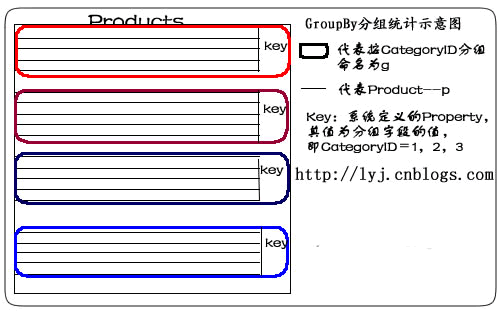
如果想遍历某类别中所有记录,这样:
foreach (var gp in q)
{
    if (gp.Key == 2)
    {
        foreach (var item in gp)
        {
            //do something
        }
    }
}
2.Select匿名类:
var q =
    from p in db.Products
    group p by p.CategoryID into g
    select new { CategoryID = g.Key, g };
说明:在这句LINQ语句中,有2个property:CategoryID和g。这个匿名类,其实质是对返回结果集重新进行了包装。把g的property封装成一个完整的分组。如下图所示:

如果想遍历某匿名类中所有记录,要这么做:
foreach (var gp in q)
{
    if (gp.CategoryID == 2)
    {
        foreach (var item in gp.g)
        {
            //do something
        }
    }
}
3.最大值
var q =
    from p in db.Products
    group p by p.CategoryID into g
    select new {
        g.Key,
        MaxPrice = g.Max(p => p.UnitPrice)
    };
语句描述:使用Group By和Max查找每个CategoryID的最高单价。
说明:先按CategoryID归类,判断各个分类产品中单价最大的Products。取出CategoryID值,并把UnitPrice值赋给MaxPrice。
4.最小值
var q =
    from p in db.Products
    group p by p.CategoryID into g
    select new {
        g.Key,
        MinPrice = g.Min(p => p.UnitPrice)
    };
语句描述:使用Group By和Min查找每个CategoryID的最低单价。
说明:先按CategoryID归类,判断各个分类产品中单价最小的Products。取出CategoryID值,并把UnitPrice值赋给MinPrice。
5.平均值
var q =
    from p in db.Products
    group p by p.CategoryID into g
    select new {
        g.Key,
        AveragePrice = g.Average(p => p.UnitPrice)
    };
语句描述:使用Group By和Average得到每个CategoryID的平均单价。
说明:先按CategoryID归类,取出CategoryID值和各个分类产品中单价的平均值。
6.求和
var q =
    from p in db.Products
    group p by p.CategoryID into g
    select new {
        g.Key,
        TotalPrice = g.Sum(p => p.UnitPrice)
    };
语句描述:使用Group By和Sum得到每个CategoryID 的单价总计。
说明:先按CategoryID归类,取出CategoryID值和各个分类产品中单价的总和。
7.计数
var q =
    from p in db.Products
    group p by p.CategoryID into g
    select new {
        g.Key,
        NumProducts = g.Count()
    };
语句描述:使用Group By和Count得到每个CategoryID中产品的数量。
说明:先按CategoryID归类,取出CategoryID值和各个分类产品的数量。
8.带条件计数
var q =
    from p in db.Products
    group p by p.CategoryID into g
    select new {
        g.Key,
        NumProducts = g.Count(p => p.Discontinued)
    };
语句描述:使用Group By和Count得到每个CategoryID中断货产品的数量。
说明:先按CategoryID归类,取出CategoryID值和各个分类产品的断货数量。 Count函数里,使用了Lambda表达式,Lambda表达式中的p,代表这个组里的一个元素或对象,即某一个产品。
9.Where限制
var q =
    from p in db.Products
    group p by p.CategoryID into g
    where g.Count() >= 10
    select new {
        g.Key,
        ProductCount = g.Count()
    };
语句描述:根据产品的―ID分组,查询产品数量大于10的ID和产品数量。这个示例在Group By子句后使用Where子句查找所有至少有10种产品的类别。
说明:在翻译成SQL语句时,在最外层嵌套了Where条件。
10.多列(Multiple Columns)
var categories =
    from p in db.Products
    group p by new
    {
        p.CategoryID,
        p.SupplierID
    }
        into g
        select new
            {
                g.Key,
                g
            };
语句描述:使用Group By按CategoryID和SupplierID将产品分组。
说明: 既按产品的分类,又按供应商分类。在by后面,new出来一个匿名类。这里,Key其实质是一个类的对象,Key包含两个Property:CategoryID、SupplierID。用g.Key.CategoryID可以遍历CategoryID的值。
11.表达式(Expression)
var categories =
    from p in db.Products
    group p by new { Criterion = p.UnitPrice > 10 } into g
    select g;
语句描述:使用Group By返回两个产品序列。第一个序列包含单价大于10的产品。第二个序列包含单价小于或等于10的产品。
说明:按产品单价是否大于10分类。其结果分为两类,大于的是一类,小于及等于为另一类。
Exists/In/Any/All/Contains操作符
适用场景:用于判断集合中元素,进一步缩小范围。
Any
说明:用于判断集合中是否有元素满足某一条件;不延迟。(若条件为空,则集合只要不为空就返回True,否则为False)。有2种形式,分别为简单形式和带条件形式。
1.简单形式:
仅返回没有订单的客户:
var q =
    from c in db.Customers
    where !c.Orders.Any()
    select c;
生成SQL语句为:
SELECT [t0].[CustomerID], [t0].[CompanyName], [t0].[ContactName],
[t0].[ContactTitle], [t0].[Address], [t0].[City], [t0].[Region],
[t0].[PostalCode], [t0].[Country], [t0].[Phone], [t0].[Fax]
FROM [dbo].[Customers] AS [t0]
WHERE NOT (EXISTS(
    SELECT NULL AS [EMPTY] FROM [dbo].[Orders] AS [t1]
    WHERE [t1].[CustomerID] = [t0].[CustomerID]
   ))
2.带条件形式:
仅返回至少有一种产品断货的类别:
var q =
    from c in db.Categories
    where c.Products.Any(p => p.Discontinued)
    select c;
生成SQL语句为:
SELECT [t0].[CategoryID], [t0].[CategoryName], [t0].[Description],
[t0].[Picture] FROM [dbo].[Categories] AS [t0]
WHERE EXISTS(
    SELECT NULL AS [EMPTY] FROM [dbo].[Products] AS [t1]
    WHERE ([t1].[Discontinued] = 1) AND
    ([t1].[CategoryID] = [t0].[CategoryID])
    )
All
说明:用于判断集合中所有元素是否都满足某一条件;不延迟
1.带条件形式
var q =
    from c in db.Customers
    where c.Orders.All(o => o.ShipCity == c.City)
    select c;
语句描述:这个例子返回所有订单都运往其所在城市的客户或未下订单的客户。
Contains
说明:用于判断集合中是否包含有某一元素;不延迟。它是对两个序列进行连接操作的。
string[] customerID_Set =
    new string[] { "AROUT", "BOLID", "FISSA" };
var q = (
    from o in db.Orders
    where customerID_Set.Contains(o.CustomerID)
    select o).ToList();
语句描述:查找"AROUT", "BOLID" 和 "FISSA" 这三个客户的订单。 先定义了一个数组,在LINQ to SQL中使用Contains,数组中包含了所有的CustomerID,即返回结果中,所有的CustomerID都在这个集合内。也就是in。 你也可以把数组的定义放在LINQ to SQL语句里。比如:
var q = (
    from o in db.Orders
    where (
    new string[] { "AROUT", "BOLID", "FISSA" })
    .Contains(o.CustomerID)
    select o).ToList();
Not Contains则取反:
var q = (
    from o in db.Orders
    where !(
    new string[] { "AROUT", "BOLID", "FISSA" })
    .Contains(o.CustomerID)
    select o).ToList();
1.包含一个对象:
var order = (from o in db.Orders
             where o.OrderID == 10248
             select o).First();
var q = db.Customers.Where(p => p.Orders.Contains(order)).ToList();
foreach (var cust in q)
{
    foreach (var ord in cust.Orders)
    {
        //do something
    }
}
语句描述:这个例子使用Contain查找哪个客户包含OrderID为10248的订单。
2.包含多个值:
string[] cities =
    new string[] { "Seattle", "London", "Vancouver", "Paris" };
var q = db.Customers.Where(p=>cities.Contains(p.City)).ToList();
语句描述:这个例子使用Contains查找其所在城市为西雅图、伦敦、巴黎或温哥华的客户。
总结一下这篇我们说明了以下语句:
| Group By/Having | 分组数据;延迟 |
| Any | 用于判断集合中是否有元素满足某一条件;不延迟 |
| All | 用于判断集合中所有元素是否都满足某一条件;不延迟 |
| Contains | 用于判断集合中是否包含有某一元素;不延迟 |
本系列链接:LINQ体验系列文章导航
LINQ推荐资源
LINQ专题:http://kb.cnblogs.com/zt/linq/ 关于LINQ方方面面的入门、进阶、深入的文章。
LINQ小组:http://space.cnblogs.com/group/linq/ 学习中遇到什么问题或者疑问提问的好地方。
代码:
style="width: 18px; border: 0px solid red;">
<select name="r00" style="margin-left: -101px; width: 118px; background-color: #FFEEEE;"
onchange="document.all.re_name.value=this.value;">
<option value="1">1</option>
<option value="2">2</option>
<option value="3">3</option>
</select>
</span>
说明:
该代码兼容性非常差,在XHTML文档中或在非IE浏览下浏览均不能达到预期效果,原因可能是它们的 select 元素的 z-index 太高,并且 css 定位方式不同,部署于应用还需改进代码。
string chkCode = string.Empty;
//颜色列表,用于验证码、噪线、噪点
//Color[] color ={Color.White, Color.Yellow, Color.LightBlue, Color.LightGreen,
//                Color.Orange, Color.LightCyan, Color.LightPink,
//                Color.LightSalmon };
Color[] color = {Color.Black, Color.Blue, Color.Red, Color.DarkViolet,
                 Color.Chocolate, Color.DarkGreen, Color.DeepSkyBlue,
                 Color.DarkCyan };
//字体列表,用于验证码
string[] font = {"Times New Roman", "MS Mincho", "Book Antiqua", "Gungsuh",
                 "PMingLiU", "Impact" };
//验证码的字符集,去掉了一些容易混淆的字符
char[] character ={'2', '3', '4', '5', '6', '8', '9', 'A', 'B', 'C', 'D', 'E',
                   'F', 'G', 'H', 'J', 'K', 'L', 'M', 'N', 'P', 'R', 'S', 'T',
                   'W', 'X', 'Y' };
Random rnd = new Random();
//生成验证码字符串
for (int i = 0; i < 4; i++)
{
    chkCode += character[rnd.Next(character.Length)];
}
//把验证码存入session
Session["chkCode"] = chkCode;
Bitmap bmp = new Bitmap(65, 20);
Graphics g = Graphics.FromImage(bmp);
g.Clear(Color.Transparent);//背景色
//画噪线
for (int i = 0; i < 0; i++)
{
    int x1 = rnd.Next(65);
    int y1 = rnd.Next(20);
    int x2 = rnd.Next(65);
    int y2 = rnd.Next(20);
    Color clr = color[rnd.Next(color.Length)];
    g.DrawLine(new Pen(clr), x1, y1, x2, y2);
}
//画验证码字符串
for (int i = 0; i < chkCode.Length; i++)
{
    string fnt = font[rnd.Next(font.Length)];
    Font ft = new Font(fnt, 15);
    Color clr = color[rnd.Next(color.Length)];
    g.DrawString(chkCode[i].ToString(), ft, new SolidBrush(clr),
        (float)i * 15 + 2, (float)0);
}
//画噪点
for (int i = 0; i < 50; i++)
{
    int x = rnd.Next(bmp.Width);
    int y = rnd.Next(bmp.Height);
    Color clr = color[rnd.Next(color.Length)];
    bmp.SetPixel(x, y, clr);
}
//清除该页输出缓存,设置该页无缓存
Response.Buffer = true;
Response.ExpiresAbsolute = System.DateTime.Now.AddMilliseconds(0);
Response.Expires = 0;
Response.CacheControl = "no-cache";
Response.AppendHeader("Pragma", "No-Cache");
//将验证码图片写入内存流,并将其以 "image/Png" 格式输出
MemoryStream ms = new MemoryStream();
try
{
    bmp.Save(ms, ImageFormat.Png);
    Response.ClearContent();
    Response.ContentType = "image/Png";
    Response.BinaryWrite(ms.ToArray());
}
finally
{
    //显式释放资源
    bmp.Dispose();
    g.Dispose();
}推荐参考更新的文章:.NET 5 / ASP.NET Core / ASP.NET Frameworks 从纯真 IP 数据库(QQWry.Dat)中查询 IP 归属地
纯真IP数据库官方下载地址:http://www.cz88.net/
之前我写过将 QQWry.Dat 转为 Access 格式后,在 ASP.NET 中通过简单算法去查询,缺点是 IP 数据库体积变大。现在有了更简单的方法:
1,下载 IPLocation.dll (备用地址),将它放在网站的 Bin 目录下,将 QQWry.Dat 放在网站的任何位置(一般为 App_Data 目录)。刷新解决方案管理器。
2,在使用的页面加入引用
using IPLocation;
或者在 web.config 文件中,节点 pages -> controls 添加
<add tagPrefix="IPLocation" namespace="IPLocation" assembly="IPLocation"/>
3,调用方法:
Label1.Text = IPLocation.IPLocation.IPLocate(Server.MapPath("~/App_Data/QQWry.Dat"), TextBox1.Text.Trim());
方法 IPLocate() 参数一为 QQWry.Dat 路径,参数二为 IP 地址,返回 IP 归属地。
够简单吧,补充一点,在 VS2003 需要在项目中添加 IPLocation.dll 的引用。
研究了两个小时,确认了一个BUG。
平台:VS2005,VS2008 (VS2003未知)
Framework:2.0,3.5 (1.1未知)
首先跟我做一遍,非常简单:
一、在 VS 中新建网站;
二、已有 Default.aspx,再建 Default2.aspx;
三、在这两个网页的 Page_Load 事件上分别加上断点;
四、在 Default2.aspx 中拖入一个 ImageButton,并设该页为起始页;
五、运行。
这时可以发现,程序在两处断点的地方都会停下来,而这两上网页根本就没有任何关系,只是在同一级目录而已。
经测试,ImageMap 控件也有同样的现象,其它的就没一一去试了。
建议大家尽量用Button代替ImageButton。按照下面的做法可以把Button美化成和ImageButton一样的效果,甚至更棒!
方法如下:
给 Button 加上 CssClass 属性来写样式,或在App_Themes 的 .skin 文件中定义 Button 的属性
然后在 .css 文件中处理它的样式,例如:
border:0;
color: #FFFFFF;
font-size: 14px;
font-weight:bold;
text-align: center;
vertical-align:middle;
line-height:27px;
height: 27px;
width: 77px;
background-color: transparent;
background-image: url(Images/button.gif);/*背景*/
background-position: center center;
}
这样就可以了,这时你会发现写在 Button 上的 Text 会随着你的鼠标按下而偏移,这个效果是不是 ImageButton 所没有的呢?