



1. 跨子域的iframe高度自适应
2. 完全跨域的iframe高度自适应
同域的我们可以轻松的做到
1. 父页面通过iframe的contentDocument或document属性访问到文档对象,进而可以取得页面的高度,通过此高度值赋值给iframe tag。
2. 子页面可以通过parent访问到父页面里引入的iframe tag,进而设置其高度。
但跨域的情况则不允许对子页面或父页面的文档进行访问(返回undefined),所以我们要做的就是打通或间接打通这个壁垒。
一、跨子域的iframe高度自适应
比如 'a.jd.com/3.html' 嵌入了 'b.jd.com/4.html',这种跨子域的页面
3.html
|
1 2 3 4 5 6 7 8 9 10 11 12 13 |
|
4.html
|
1 2 3 4 5 6 7 8 9 10 11 12 13 14 15 16 17 18 19 20 21 22 23 24 25 26 27 28 |
|
可以看到与上一篇对比,只要在两个页面里都加上document.domain就可以了
二、完全跨域的iframe高度自适应
分别有以下资源
- 页面 A:http://snandy.github.io/lib/iframe/A.html
- 页面 B:http://snandy.github.io/lib/iframe/B.html
- 页面 C:http://snandy.jd-app.com
- D.js:http://snandy.github.io/lib/iframe/D.js
这四个资源有如下关系
1. A里嵌入C,A和C是不同域的,即跨域iframe
2. C里嵌入B,C和B是不同域的,但A和B是同域的
3. C里嵌入D.js,D.js放在和A同域的项目里
通过一个间接方式实现,即通过一个隐藏的B.html来实现高度自适应。
A.html
嵌入页面C: http://snandy.jd-app.com
|
1 2 3 4 5 6 7 8 9 10 |
|
B.html
嵌入在C页面中,它是隐藏的,通过parent.parent访问到A,再改变A的iframe(C.html)高度,这是最关键的,因为A,B是同域的所以可以访问A的文档对象等。
|
1 2 3 4 5 6 7 8 9 10 11 12 13 14 15 16 17 18 19 20 21 22 23 24 25 26 27 28 |
|
C.html
嵌入在A中,和A不同域,要实现C的自适应,C多高则A里的iframe就设为多高。C里嵌入B.html 和 D.js
|
1 2 3 4 5 6 7 8 9 10 11 12 13 14 15 16 17 18 19 |
|
D.js
在页面C载入后计算其高度,然后将计算出的height赋值给C里引入的iframe(B.html)的src
|
1 2 3 4 5 6 7 8 9 10 11 12 13 14 15 16 |
|
线上示例:http://snandy.github.io/lib/iframe/A.html
原文:http://mathewsanders.com/designing-adaptive-layouts-for-iphone-6-plus/
翻译:叮当当咚当当小胖妞呀
从IOS6开始,苹果公司就一直建议我们使用自适应布局,但是迄今为止,我发现大家都在回避这个问题,考虑的最多的仍然是固定布局。
iPhone 6的上市让人们很难再去逃避自适应布局这个问题,四种屏幕尺寸(如果要支持iPad就要上升到5种)、三种分辨率和转向似乎让着手于自适应布局变得更加简单。

在文章的最后,你应该能流畅使用 storyboards、 约束(constraints)和 size class特性,这三个是Apple为开发和制作自适应布局提供的Xcode工具。
所以下载Xcode6,给自己来杯饮料,留上一个小时的时间,让我们开始吧!
- Storyboards
- 模拟尺寸
- 约束
- 头部和尾部空间
- 横向空间约束
- 同等宽度约束
- 纵横比约束
- 约束管理
- 添加约束
- 检查和编辑现有约束
- 删除约束
- 布局问题和冲突
- 错位视图警告
- 约束缺失错误
- Size Classes
- 宽度和高度特性
- 我们的目标…
- 为通用的size class添加约束
- 为iPhone纵向布局添加约束
- 为iPhone横向布局添加约束
- 编辑助手:设备预览
- 为iPad布局添加约束
- 使用布局和间隔视图
- 布局视图样例
- 间隔视图样例
- 下一步
Storyboards
Xcode中,storyboards可以让你在屏幕上拖动和放置原生对象(例如按钮、图片、文本框和标签)并且定义每个屏幕之间如何连接。
在Xcode专业术语中,可以看到、摸到、互动的用户界面元素,我们称之为 视图(按钮、图片、文本框、标签等等)。
包含并管理所有那些视图的屏幕被称为 视图控制器,我倾向于交替使用这些术语。
当我们在一个storyboard上添加视图控制器的时候,它的纵横比其实跟任何设备都不匹配,事实上,它是一个完美的600pt*600pt的正方形:

这提醒了我们,storyboard屏幕并不代表特定硬件上的屏幕,而是 任何IOS设备的抽象表现。
模拟尺寸
也许你不介意在600pt*600pt的画布上操作,但是在实际大小上操作可能会更有帮助。
我们可以非常方便的在Xcode里改变视图控制器模拟的尺寸和转向:

约束
向你们展示约束的最好方法是实例。
我们先创建一个简单的包含一个屏幕的storyboard(模拟4英寸iPhone的尺寸),再添加两个相邻的正方形。

当我们在竖屏中运行app的时候,这两个正方形完全按照我们的布局排列,当我们变成横屏时,它们仍然忠于自己的坐标:

当我们使用iPhone 6模拟器运行项目的时候,我们可以再一次看到,我们的布局并没有自适应不同的屏幕尺寸,屏幕右边多出了可见的空白区域。

这是由于没有约束,这些对象仍然会按照我们在storyboard上创建的x,y坐标和面积来定位。
所以让我们开始添加约束,看看会对它们有些什么影响。
头部和尾部空间
我们在蓝色方块前添加10pt的头部空间约束,在红色方块后添加10pt的尾部空间约束。

当我们运行项目的时候,约束把蓝色方块固定在屏幕左侧,把红色方块固定在右侧。

横向空间约束
我们在两个方块之间再添加一个10pt的横向空间约束,就像上一个约束一样,这样会让两个方块之间有一个固定的空间。

当我们运行项目的时候,会发现一个意料之外的结果:我们所有的约束都满足了,但是为了满足所有约束,其中一个方块被拉伸了。
这似乎告诉我们这样一件事:除非被告知,否则IOS会尽量让大多数对象都保持“自然”大小。

同等宽度约束
我们添加一个同等宽度约束。

当运行项目的时候,我们可以看到两个方块宽度的增量相同。

纵横比约束
最后,对两个方块添加纵横比约束。

这个约束保证了宽度和高度的比永远是相同的。
当我们运行app的时候,我们可以看到每个方块的宽度在增加,高度也同时在增加。

用iPhone 6模拟器运行项目,覆盖我们之前添加过的约束,你可以看到这两个正方形是如何利用可用空间来拉伸的。

约束管理
现在你已经看到了我们是如何使用约束的,下面我们来介绍一下具体操作。
提示:尽量少使用约束
添加约束的一个要点是试着挑战自己,越少使用约束越好。
虽然我并不认为添加的约束数量能够很大程度上影响IOS的性能,但是越少的使用约束,你的布局就会越好维护。
添加约束
在storyboard中添加约束有三个方法:
- 约束弹窗也许最好的方法就是选择一个或多个对象,从其中一个弹窗中添加约束。我认为这是个很好的方法,因为可以看到现有约束的范围。如果有一条约束不可用,可能就意味着你需要两个或更多对象来实施这条约束。

- ctrl + 拖动你可以按住ctrl键,同时拖动到一个对象上(可以是相邻对象、父级对象或者是自身),会出现一个浮层告诉你可以被添加的约束有哪些。这是我最喜欢的添加约束的方法,因为你不需要把你的鼠标移动到大老远的底部再回到对象。

- 菜单/绑定你也可以选择一个或多个对象,在菜单中点击 editor -> pin来选择约束,这其实是最没有效率的方法,但是如果你发现自己不停的重复添加一种约束,也许为一个或多个选项添加绑定更合理一点。
检查和编辑现有约束
检查视图中应用的约束最简单的办法就是选择视图,切换到Size检查面板。
或者在文档大纲层次面板中切换constant数值。
无论是哪种方法,选择约束可以让你直接更新它。

删除约束
同样的,约束也可以通过高亮+点击删除按钮来删除。
要删除一个视图的所有约束,或者屏幕中的所有约束,在布局问题弹窗中有一条捷径:

布局问题和冲突
当我们在storyboard中添加约束的时候,Xcode总会给出一些关于这些约束的警告或者错误。
有时候这些问题可以忽略不计,但是更多的时候,它们必须被解决。
查看约束警告和错误最好在文档大纲面板中,每个视图控制器会有一个红色或者黄色的icon来表示是不是有布局问题:

错位视图警告
一个比较常见的警告是错位视图警告,如果约束规定这个视图应该在的地方,和这个视图实际在的地方不匹配,那么这种警告随时会出现。
当你转换模拟尺寸或者不小心用鼠标移动了一个视图,这些警告也会出现。
点击一个错位的视图,屏幕上会出现一个虚线框,告诉你约束规定了这个视图应该在的位置。

如果点击警告,会出现一个带有几个选项的浮层,你可以选择让Xcode更新约束来匹配storyboard上的位置,也可以让Xcode更新框架来移动或者拉伸视图,使它们回到约束规定的位置。
缺失约束错误
让我们回到一开始蓝方块和红方块的例子,我们没有添加过一个关于纵向位置的约束,但当我们运行app的时候看起来完全没问题,因为IOS会认为纵向位置就是我们在storyboard上放置的位置,不过为了避免一些意料之外的行为,我们最好还是规定一下。
在 顶部布局向导添加顶部空间约束可以消除一些说不定道不明的约束和错误。

Size Classes
为了在大多数基础布局或者更高级的布局上使用约束,你需要同时使用size classes。
Size classes是一种能够告诉你物理设备宽度和高度的特性。
当我们在storyboard的屏幕上添加对象或者约束时,只有设备符合当前的宽高特性,对象才会显现,约束才会被应用。
这是一个非常有用的方法,它让我们确定了不同设备和转向下布局的变化。
高度和宽度特性
使用 紧凑(compact)、 任意(any)和 正常(regular)这三种的组合,可以让我们确定一些范围内的设备布局。
虽然不能涉及每一个变化(比如不能确定iPhone 6 Plus的竖向模式,也不能让iPad的转向消失),但是大多数的变化都可以确定。

我们说过,介绍size classes最简单的方法是实例,所以让我们看一个例子。
我们的目标…
作为例子,我们做一个Instagram详情页的简单版本,可以适应大屏和转向。
我们的目标是创建一个布局,它可以机智的适应更大的iPhone 6设备(我说的机智,是指只有照片会放大,其他的元素如头像照片仍然不变),并且当设备横屏的时候,图片和元数据会并肩排列,而不是像竖屏时的上下排列。

为通用的size class添加约束
跟之前的例子不同,这次我们不使用模拟尺寸度量,我们使用通用size class的抽象方形布局,这样会使我们记住,为这个size class添加的任何视图和约束,只能是那些添加在任意屏幕尺寸和转向上的视图和约束。
我们需要用到这些约束:

除了必要的空间、间隙和纵横比约束,我们还需要让某些对象排列在顶部或者底部。
现在,在你的storyboard上添加视图和约束吧。做这步的时候,我的storyboard长这样:

注意,现在我们有了所有转向上所需要的元素,但是我没有费心完成每个转向上的布局,下一步我们才会做!
为iPhone纵向布局添加约束
现在,我们把size class切换到 紧凑宽度和 正常高度,这个尺寸特性的组合适用于任何竖屏下的iPhone设备。
如果要切换size classes,点击storyboard中下方的size class标签,选择你想要看到的宽高组合。

注意,当你切换size class时,视图控制器的尺寸会更新来显示新的抽象布局。
最后,你可以重新定位、拉伸视图和添加竖屏上的约束了。这里有一些我添加到竖向布局上的约束:

这是我做到这步时,我的storyboard的样子:

在这个阶段,你可以用任何的iPhone模拟器(3.5、4、4.7或者5.5英寸屏幕)来运行你的项目,看看竖屏情况下的布局是否合理,虽然如果转向成横屏时,布局看上去会一团糟。
注意,我们没有固定图片的宽度,我们只是简单地把图片的左右边缘固定在屏幕两侧。当变为更大的iPhone 6屏幕尺寸时,图片会被拉伸,又因为我们添加了一个固定图片纵横比的约束,所以高度也会同时增加。
为iPhone横向布局添加约束
现在切换size class到 任意宽度和 紧凑高度,这种尺寸特性的组合适用于任何横屏下的iPhone设备,并且会为了满足横屏视图下的目标更新布局。
这次,图片的顶部、左边和底部边缘都被固定在父级视图的边缘。
这个局部另一个有意思的地方是,在评论标签上添加的尾部空间约束。
当图片的约束使得图片变大的时候,这个标签上的约束会使得自身变窄。为了适应这种视图下的文本,文本高度需要增加到两行——的确如此!

下图是我做到这步时storyboard的样子。注意,在文档大纲中,一些约束会稍稍渐隐,这些约束是在竖向视图中我们添加的,它们仍然存在,但是当我们选中当前的宽高特性时,它们不会被应用。

也要注意,当你转换宽高特性时,storyboard会更新以便显示你为那些特性增加的约束。太棒了!

现在运行项目,我们会发现当转向改变时,我们有了一个既适用于横屏又适用于竖屏的布局,更棒的是在转向时,会有一个完美的过渡动画。
我把整个过渡动画放慢,这样你们能看的更加清楚。注意动画中也有层级关系,正由于此,即使在正常布局下视图并没有重叠,我们也需要考虑如何安排视图的层级关系……
编辑助手:设备预览
Xcode另外一个很有用的东西:设备预览助手。你不再需要无数次运行项目来检查你的布局是否正确,你只需要使用编辑助手storyboard预览,选择你想要的所有设备和转向就可以了。
这并不是完美的(比如导航条的颜色在这个例子中缺失了),但是它却是一个很好地选择,它可以让你把你自己的语言切换到双倍长度伪语言,可以在你的storyboard中重复任何文本。

这是我storyboard上的预览助手,它展示了一个3.5英寸横屏和4英寸竖屏的iPhone,你可以看到我还需要再加工加工来适应更长的标签……-_-
为iPad布局添加约束
现在,切换size classes到 正常宽度和 正常高度,这是iPad横屏和竖屏的特性。
就像之前一样,我们重新定位、拉伸我们的视图。对于iPad布局,我决定使用固定尺寸的图片(所以它不会像在iPhone上那样切换横竖屏时会改变大小),元数据都显示在图片底部。
下图是我在重新排列视图并添加了约束之后的storyboard:

到现在为止,我们为某些特别的size class特性添加了约束,但是现在我们要尝试些不同的东西。
由于iPad上会有多余的空间,我们不要仅仅只是重排视图,让我们来加一点额外的内容。对于这个例子来说,我们再加两张图片(也许是在这张主照片之前和之后拍摄的照片)。
这是我的storyboard更新之后的样子:

我原本可以手动输入这些次级图片的宽高,但我没有,取而代之的是我让它们的尺寸变成主图片的某个比例。
这样做的好处是如果我们决定改变主图片的尺寸,布局的其他部分会自动的计算并且更新次级图片的宽高,而不用我们手动输入。

这是一张我截的图,我改变了主图片的宽度约束,可以看到其他的部分也随之更新了。
我没有在iPad模拟器上运行项目并截屏,不过这里有一些横屏和竖屏的效果图:

使用布局和间隔视图
Xcode中有些约束我们可以随时运用,但是对于一些些常见的布局,我们需要一点帮助。
布局视图样例
要把一个视图的边缘固定在父级视图的边缘,或者把它固定在父级视图的正中心是件很简单的事情,~~但是我没有发现简便的方法,让视图固定在离正中心有一段固定距离的地方。~~感谢Jeff Nouwen指出,在把视图固定在中间后,你可以改变constant值来达到你的期望。
理论上来说,我们需要的是一个‘ 中心排列导向’,即任何视图都能水平和垂直居中与父级视图中:

为了实现这个目标,通过现在我们可以使用的约束,我们把我们的视图嵌入一个外层视图(这个外层视图没有背景色,只是为了帮助我们布局而存在),可以把它定位在父级视图的中间。
通过这个方法,你的约束看起来可能像这样:

现在我比较喜欢让我的布局层级尽量平。另外一个不使用外层视图的方法,我叫它 布局视图。
使用这种方法,我倾向于在storyboard中添加一个颜色明亮的视图,然后把它的hidden属性设置为true,你仍然可以在storyboard布局中看到它(虽然稍稍渐隐),但是运行模拟器的时候它不会出现。
现在你在你的视图和布局视图中可以添加 居中排列(align center to center)。

间隔视图样例
之前我们看到了我们是如何固定视图边缘到父级视图边缘的间隙,使得当父级视图变大时,间隙约束也会让视图变大。
但是如果我们想要视图仍然保持原来的大小,在父级视图变大时,视图之间的间隙也变大呢?

理论上来说,我们想要某种类似 同等宽度约束的约束,只不过同等宽度约束是作用在视图上,我们想让它作用在约束上。
此时我们需要添加 间隔视图来帮助我们布局,但由于我们不想在运行app时看到它们,我们会把它们的hidden属性设置为true。
使用这项技术的方法,是为每一个你想要等比增长的间隙添加一个间隔视图,把其他视图的边缘固定在间隔视图的边缘上,然后为所有的间隔视图添加 同等宽度约束。

下一步
现在希望你们已经完全有信心开始探索应用约束的布局了。
不要指望能即刻成功,Xcode是一个非常复杂的工具,除了storyboard和约束之外它还有很多其他功能,有些功能刚开始使用会觉得很神秘和困惑。就像其他复杂的工具一样,在你熟悉它的怪癖之前你还需要一段适应时间,但是我建议你尽早的去熟悉它,因为我预计(至少我希望)下一代设计师会更多地使用Xcode这样的工具而非Photoshop。
如果你是一位创建设计规范的设计师,并想让IOS开发者遵循你的规范,你应该开始考虑和你的设计团队沟通的最好方法。也许你会创建一个视觉语言来描述你想要应用的约束。
我个人认为,设计师应该更多地承担一些他们创建工作上的责任,而不是让一个前端开发人员重新创建设计意图,而设计师只是管理storyboard文件。
如果你发现这个教程上有任何难以理解的地方,或者有错误的敌方,请让我知道,我会尽快更新这篇文章。
Apple’s newest devices feature the Retina Display, a screen that packs double as many pixels into the same space as older devices. For designers this immediately brings up the question, “What can I do to make my content look outstanding on these new iPads and iPhones?”. First there are a few tough questions to consider, but then this guide will help you get started making your websites and web apps look amazingly sharp with Retina images!

Things to Consider When Adding Retina Images
The main issue with adding retina images is that the images are double as large and will take up extra bandwidth (this won’t be an issue for actual iOS apps, but this guide is covering web sites & web apps only). If your site is mostly used on-the-go over a 3G network it may not be wise to make all your graphics high-definition, but maybe choose only a select few important images. If you’re creating something that will be used more often on a WI-FI connection or have an application that is deserving of the extra wait for hi-res graphics these steps below will help you target only hi-res capable devices.
Simple Retina Images
The basic concept of a Retina image is that your taking a larger image, with double the amount of pixels that your image will be displayed at (e.g 200 x 200 pixels), and setting the image to fill half of that space (100 x 100 pixels). This can be done manually by setting the height and width in HTML to half the size of your image file.
<img src="my200x200image.jpg" width="100" height="100">
If you’d like to do something more advanced keep reading below for how you can apply this technique using scripting.
Creating Retina Icons for Your Website
When users add your website or web app to their homescreen it will be represented by an icon. These sizes for regular and Retina icons (from Apple) are as follows:

| iPhone | 57 x 57 |
|---|---|
| Retina iPhone | 114 x 114 |
| iPad | 72 x 72 |
| Retina iPad | 144 x 144 |
For each of these images you create you can link them in the head of your document like this (if you want the device to add the round corners remove -precomposed):
<link href="touch-icon-iphone.png" rel="apple-touch-icon-precomposed" />
<link href="touch-icon-ipad.png" rel="apple-touch-icon-precomposed" sizes="72x72" />
<link href="touch-icon-iphone4.png" rel="apple-touch-icon-precomposed" sizes="114x114" />
<link href="touch-icon-ipad3.png" rel="apple-touch-icon-precomposed" sizes="144x144" />
If the correct size isn’t specified the device will use the smallest icon that is larger than the recommended size (i.e. if you left out the 114px the iPhone 4 would use the 144px icon).
Retina Background Images
Background images that are specified in your CSS can be swapped out using media queries. You’ll first want to generate two versions of each image. For example ‘bgPattern.png’ at 100px x 100px and ‘bgPattern@2x.png’ at 200px x 200px. It will be useful to have a standard naming convention such as adding @2x for these retina images. To add the new @2x image to your site simply add in the media query below (You can add any additional styles that have background images within the braces of the same media query):
.repeatingPattern {
     background: url(../images/bgPattern.png) repeat;
     background-size: 100px 100px;
}

@media only screen and (-webkit-min-device-pixel-ratio: 2) {
     .repeatingPattern {
          background: url(../images/bgPattern@2x.png) repeat;
     }
}
JavaScript for Retina Image Replacement
For your retina images that aren’t backgrounds the best option seems to be either creating graphics with CSS, using SVG, or replacing your images with JavaScript. Just like the background images, you’ll want to create a normal image and one ‘@2x’ image. Then with JavaScript you can detect if the pixel ratio of the browser is 2x, just like you did with the media query:
if (window.devicePixelRatio == 2) {

//Replace your img src with the new retina image

}
If you’re using jQuery you could quickly replace all your images like this very basic example below. It’s a good idea to add a class to identify the images with hi-res versions so you don’t replace any others by mistake. I’ve added a class=”hires” for this example. Also make sure you have the standard (non-retina) image height and width set in the HTML:
<img class="hires" alt="" src="search.png" width="100" height="100" />
<script type="text/javascript">
$(function () {

	if (window.devicePixelRatio == 2) {

          var images = $("img.hires");

          // loop through the images and make them hi-res
          for(var i = 0; i < images.length; i++) {

            // create new image name
            var imageType = images[i].src.substr(-4);
            var imageName = images[i].src.substr(0, images[i].src.length - 4);
            imageName += "@2x" + imageType;

            //rename image
            images[i].src = imageName;
          }
     }

});
</script>
Server-Side Retina Images
If you’d like to implement a server-side retina image solution, I recommend checking out Jeremy Worboys’ Retina Images (which he also posted in the comments below). His solution uses PHP code to determine which image should be served. The benefit of this solution is that it doesn’t have to replace the small image with the retina one so you’re using less bandwidth, especially if you have lots of images that you’re replacing.
Website Optimization for Retina Displays
If you’re looking for additional information on creating Retina images, I’ve recently had a short book published called Website Optimization for Retina Displays that covers a range of related topics. It contains some of what is above, but also includes samples for many different situations for adding Retina images. It explains the basics of creating Retina images, backgrounds, sprites, and borders. Then it talks about using media queries, creating graphics with CSS, embedding fonts, creating app icons, and more tips for creating Retina websites.
最近开发了一款 iPhone 客户端应用,提交到 App Store,被拒绝(Rejected)。然后修复问题后再次提交,仍然被拒绝,奇怪的是 Resolution Center 中的拒绝原因跟上次一模一样。
幸好我在应用中做了记录客户端信息的功能,查看后发现,IP 来自“美国Apple公司”的启动版本竟然是第一次提交的版本。于是我登录 iTunes Connect 跟苹果客服联系,对方回复他们打开的确实是有问题那个版本。
正当迷茫之时,无意中在 iTunes Connect 看到 Binary Details 这个按钮,点进去一看明白了。原来,虽然我在 Xcode 中重新上传了源文件,但是这里看到的仍然是旧版本。于是我点右上角的“Reject This Binary”按钮,重新通过 Xcode 上传源代码,过会儿再进入 Binary Details 查看,还是没有变化。苦恼中。
是不是 Xcode 中要做什么处理呢?我是新手,只知道点菜单栏上的三角形按钮是调试,具体要怎么使用 Debug / Release / Run / Test / Profile / Analyze / Archive 还真是不太明白,于是对这些功能一阵乱点,意外发现 Organizer 的 Archives 中项目的 Creation Data 变成了刚才的时间,而且下面也多了一条记录,赶紧 Distribute!
一柱香后再回头去看看 Binary Details,终于看到新版本的信息了。
Waiting For Review 中……

有时候已知一个 ID 的数组,需要读取这些记录内容,SQL 可以联接多个“或”关系去读取,或使用“In”语句,在 LINQ TO SQL 中可以这样来做:
List<int> ids = new List<int> { 1, 2, 3 };
List<string> tbs = db.dbTables.Where(c => ids.Contains<int>(c.ID)).ToList();
我们继续讲解LINQ to SQL语句,这篇我们来讨论Group By/Having操作符和Exists/In/Any/All/Contains操作符。
Group By/Having操作符
适用场景:分组数据,为我们查找数据缩小范围。
说明:分配并返回对传入参数进行分组操作后的可枚举对象。分组;延迟
1.简单形式:
var q =
    from p in db.Products
    group p by p.CategoryID into g
    select g;
语句描述:使用Group By按CategoryID划分产品。
说明:from p in db.Products 表示从表中将产品对象取出来。group p by p.CategoryID into g表示对p按CategoryID字段归类。其结果命名为g,一旦重新命名,p的作用域就结束了,所以,最后select时,只能select g。当然,也不必重新命名可以这样写:
var q =
    from p in db.Products
    group p by p.CategoryID;
我们用示意图表示:
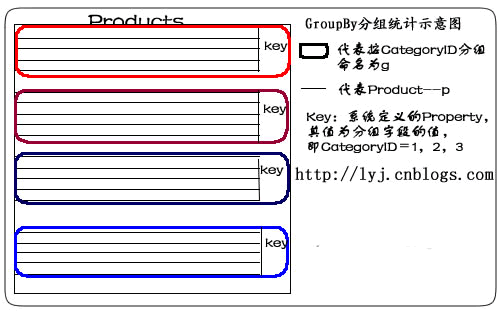
如果想遍历某类别中所有记录,这样:
foreach (var gp in q)
{
    if (gp.Key == 2)
    {
        foreach (var item in gp)
        {
            //do something
        }
    }
}
2.Select匿名类:
var q =
    from p in db.Products
    group p by p.CategoryID into g
    select new { CategoryID = g.Key, g };
说明:在这句LINQ语句中,有2个property:CategoryID和g。这个匿名类,其实质是对返回结果集重新进行了包装。把g的property封装成一个完整的分组。如下图所示:

如果想遍历某匿名类中所有记录,要这么做:
foreach (var gp in q)
{
    if (gp.CategoryID == 2)
    {
        foreach (var item in gp.g)
        {
            //do something
        }
    }
}
3.最大值
var q =
    from p in db.Products
    group p by p.CategoryID into g
    select new {
        g.Key,
        MaxPrice = g.Max(p => p.UnitPrice)
    };
语句描述:使用Group By和Max查找每个CategoryID的最高单价。
说明:先按CategoryID归类,判断各个分类产品中单价最大的Products。取出CategoryID值,并把UnitPrice值赋给MaxPrice。
4.最小值
var q =
    from p in db.Products
    group p by p.CategoryID into g
    select new {
        g.Key,
        MinPrice = g.Min(p => p.UnitPrice)
    };
语句描述:使用Group By和Min查找每个CategoryID的最低单价。
说明:先按CategoryID归类,判断各个分类产品中单价最小的Products。取出CategoryID值,并把UnitPrice值赋给MinPrice。
5.平均值
var q =
    from p in db.Products
    group p by p.CategoryID into g
    select new {
        g.Key,
        AveragePrice = g.Average(p => p.UnitPrice)
    };
语句描述:使用Group By和Average得到每个CategoryID的平均单价。
说明:先按CategoryID归类,取出CategoryID值和各个分类产品中单价的平均值。
6.求和
var q =
    from p in db.Products
    group p by p.CategoryID into g
    select new {
        g.Key,
        TotalPrice = g.Sum(p => p.UnitPrice)
    };
语句描述:使用Group By和Sum得到每个CategoryID 的单价总计。
说明:先按CategoryID归类,取出CategoryID值和各个分类产品中单价的总和。
7.计数
var q =
    from p in db.Products
    group p by p.CategoryID into g
    select new {
        g.Key,
        NumProducts = g.Count()
    };
语句描述:使用Group By和Count得到每个CategoryID中产品的数量。
说明:先按CategoryID归类,取出CategoryID值和各个分类产品的数量。
8.带条件计数
var q =
    from p in db.Products
    group p by p.CategoryID into g
    select new {
        g.Key,
        NumProducts = g.Count(p => p.Discontinued)
    };
语句描述:使用Group By和Count得到每个CategoryID中断货产品的数量。
说明:先按CategoryID归类,取出CategoryID值和各个分类产品的断货数量。 Count函数里,使用了Lambda表达式,Lambda表达式中的p,代表这个组里的一个元素或对象,即某一个产品。
9.Where限制
var q =
    from p in db.Products
    group p by p.CategoryID into g
    where g.Count() >= 10
    select new {
        g.Key,
        ProductCount = g.Count()
    };
语句描述:根据产品的―ID分组,查询产品数量大于10的ID和产品数量。这个示例在Group By子句后使用Where子句查找所有至少有10种产品的类别。
说明:在翻译成SQL语句时,在最外层嵌套了Where条件。
10.多列(Multiple Columns)
var categories =
    from p in db.Products
    group p by new
    {
        p.CategoryID,
        p.SupplierID
    }
        into g
        select new
            {
                g.Key,
                g
            };
语句描述:使用Group By按CategoryID和SupplierID将产品分组。
说明: 既按产品的分类,又按供应商分类。在by后面,new出来一个匿名类。这里,Key其实质是一个类的对象,Key包含两个Property:CategoryID、SupplierID。用g.Key.CategoryID可以遍历CategoryID的值。
11.表达式(Expression)
var categories =
    from p in db.Products
    group p by new { Criterion = p.UnitPrice > 10 } into g
    select g;
语句描述:使用Group By返回两个产品序列。第一个序列包含单价大于10的产品。第二个序列包含单价小于或等于10的产品。
说明:按产品单价是否大于10分类。其结果分为两类,大于的是一类,小于及等于为另一类。
Exists/In/Any/All/Contains操作符
适用场景:用于判断集合中元素,进一步缩小范围。
Any
说明:用于判断集合中是否有元素满足某一条件;不延迟。(若条件为空,则集合只要不为空就返回True,否则为False)。有2种形式,分别为简单形式和带条件形式。
1.简单形式:
仅返回没有订单的客户:
var q =
    from c in db.Customers
    where !c.Orders.Any()
    select c;
生成SQL语句为:
SELECT [t0].[CustomerID], [t0].[CompanyName], [t0].[ContactName],
[t0].[ContactTitle], [t0].[Address], [t0].[City], [t0].[Region],
[t0].[PostalCode], [t0].[Country], [t0].[Phone], [t0].[Fax]
FROM [dbo].[Customers] AS [t0]
WHERE NOT (EXISTS(
    SELECT NULL AS [EMPTY] FROM [dbo].[Orders] AS [t1]
    WHERE [t1].[CustomerID] = [t0].[CustomerID]
   ))
2.带条件形式:
仅返回至少有一种产品断货的类别:
var q =
    from c in db.Categories
    where c.Products.Any(p => p.Discontinued)
    select c;
生成SQL语句为:
SELECT [t0].[CategoryID], [t0].[CategoryName], [t0].[Description],
[t0].[Picture] FROM [dbo].[Categories] AS [t0]
WHERE EXISTS(
    SELECT NULL AS [EMPTY] FROM [dbo].[Products] AS [t1]
    WHERE ([t1].[Discontinued] = 1) AND
    ([t1].[CategoryID] = [t0].[CategoryID])
    )
All
说明:用于判断集合中所有元素是否都满足某一条件;不延迟
1.带条件形式
var q =
    from c in db.Customers
    where c.Orders.All(o => o.ShipCity == c.City)
    select c;
语句描述:这个例子返回所有订单都运往其所在城市的客户或未下订单的客户。
Contains
说明:用于判断集合中是否包含有某一元素;不延迟。它是对两个序列进行连接操作的。
string[] customerID_Set =
    new string[] { "AROUT", "BOLID", "FISSA" };
var q = (
    from o in db.Orders
    where customerID_Set.Contains(o.CustomerID)
    select o).ToList();
语句描述:查找"AROUT", "BOLID" 和 "FISSA" 这三个客户的订单。 先定义了一个数组,在LINQ to SQL中使用Contains,数组中包含了所有的CustomerID,即返回结果中,所有的CustomerID都在这个集合内。也就是in。 你也可以把数组的定义放在LINQ to SQL语句里。比如:
var q = (
    from o in db.Orders
    where (
    new string[] { "AROUT", "BOLID", "FISSA" })
    .Contains(o.CustomerID)
    select o).ToList();
Not Contains则取反:
var q = (
    from o in db.Orders
    where !(
    new string[] { "AROUT", "BOLID", "FISSA" })
    .Contains(o.CustomerID)
    select o).ToList();
1.包含一个对象:
var order = (from o in db.Orders
             where o.OrderID == 10248
             select o).First();
var q = db.Customers.Where(p => p.Orders.Contains(order)).ToList();
foreach (var cust in q)
{
    foreach (var ord in cust.Orders)
    {
        //do something
    }
}
语句描述:这个例子使用Contain查找哪个客户包含OrderID为10248的订单。
2.包含多个值:
string[] cities =
    new string[] { "Seattle", "London", "Vancouver", "Paris" };
var q = db.Customers.Where(p=>cities.Contains(p.City)).ToList();
语句描述:这个例子使用Contains查找其所在城市为西雅图、伦敦、巴黎或温哥华的客户。
总结一下这篇我们说明了以下语句:
| Group By/Having | 分组数据;延迟 |
| Any | 用于判断集合中是否有元素满足某一条件;不延迟 |
| All | 用于判断集合中所有元素是否都满足某一条件;不延迟 |
| Contains | 用于判断集合中是否包含有某一元素;不延迟 |
本系列链接:LINQ体验系列文章导航
LINQ推荐资源
LINQ专题:http://kb.cnblogs.com/zt/linq/ 关于LINQ方方面面的入门、进阶、深入的文章。
LINQ小组:http://space.cnblogs.com/group/linq/ 学习中遇到什么问题或者疑问提问的好地方。
老总总会随时扔台他朋友的本本叫我杀个毒装个软件什么的,很多都是新机预装 Vista。接触多了终于心痒痒升级自己的 Windows。其实一直想装的,可惜我的光驱只能 CD 刻录,而且跑遍整个萧山都找不到有 Vista 光盘卖,装双系统么又花时间又占空间。幸好一凡家有台记录机,所以趁周末去刻了张盘。第二天急匆匆地跑去公司,花了两个多小时把本本上将40G的东西传到服务器上备份,然后重新分区安装。
之前是有看过远景上关于安装方面的贴子,生怕中间出问题又上不了网就麻烦了。不过还是出问题了,在复制完文件后自动重启,就出现下面的错误:
...
If you do not have this disc, contact your system administrator or computer maufacturer for assistance
File: \windows\system32\drivers\tcpip.sys
status: 0x0000221
Info: Windows failed to load because a critical system driver is missing, or corrupt.
我没动过任何硬件,出现这样的错误很是摸不着头脑,想到可能的原因有:刻盘时出了问题;需要 SATA 硬盘驱动;内存不兼容……没办法,还是先找台电脑上网查查吧。身边的服务器没无线网卡不能上网,尝试在服务器安装 Nokia PC 套件还不兼容 Windows server 2003,不支持蓝牙连接。还是去其它办公室借电脑上好了。哎,不出我所料,又被逮到帮他们杀毒!汗。在网上找了半天没搜出个结果来,看来用 Vista 的人还不多,出现我的问题的人更少,我只搜到 error info 跟我相同,但 file 不同的贴子,还是没有回答的。
回来,装了两遍还是出现同样的错误,火了,先装个 XP,在 XP 下试试。漫长的等待是用电脑报打发的。。。
OK,XP 装在 D 盘,想检查是不是 SATA 硬盘的缘故,想装了 XP 应该已经有驱动了,就重起通过光盘安装 Vista 到 C 盘,啊哦,老错误。(高手别笑我,这步我都觉得荒谬)
晕,忘了 boot.ini 是在 C 盘的,进不了 XP 了,又再装了遍 XP 到 D 盘。怕了怕了,还是用镜像文件装吧。也不去研究什么原因导致的了,哎不是我的风格,可是时间宝贵呐。
老老实实装完 XP 又用虚拟光驱装入镜像,再次安装 Vista,哎,终于让我揭开她的面纱了!
一天就这么过去了,第二天继续。
Vista 已经基本解决驱动问题了,很省事,不过我还是去 HP 英文官网下了专用的驱动程序。
嗯,开始安装程序。其实 Vista 的 UAC 确实挺烦人的,特别是安装程序的时候,不过我是习惯了“用管理员身份运行”,可突然的黑屏一闪还是会让习惯的人慌一下。
在安装 .msi 程序的时候有时候会提示安装不正常,您的权限需要提升之类的错误,但无法在右键菜单找到“用管理员身份运行”项,我是这么解决的:建一个后缀名为 .cmd 的文件,写入内容:“msiexec /i C:\msi文件的地址”。然后“用管理员身份运行”这个 .cmd 文件就行了。
装完常用软件开始安装 VS 这个大家伙了。
给 C 盘分的 20 个 G 已经用了 12 个了,之前用的是 VS2005,还没装过 VS2008,所以不知道要占多少空间。前几天看过一篇文章是关于在 Vista 下安装 VS 和 SQL Server 的,作者提到的先装 VS 后装 SSMS 出错误的情况,前车之鉴,我先装了 SSMS。
最头痛的要算 IIS7 了。装入 Vista 镜像,控制面板-程序-打开或关闭 Windows 功能,参照一篇文章勾选了相关的安装项,见文。虽然我不需要在 VS2005 下调试程序,但是我暂时不想把程序框架从 2.0 升到 3.5,这几天全国范围寻找 .net 3.5 的空间商未果,真想自己弄台服务器卖空间,早起的鸟应该会有虫吃。我觉得空间商是怕技术这关,毕竟新技术万一出问题很有可能一下子解决不了,作为一个运营商就有可能被要求赔偿损失或吃官司之类的。扯远了。。。
装完 IIS7,试着架设我的 2.0 网站,经典应用程序池,身份验证,一切配置完毕,结果运行时还是出现了“IIS Worker Process 已停止工作”的对话框,偶尔出现,而且出现几次后,应用程序池就自动关闭了,用纯 HTML 站测试也一样,又把 IIS 卸了装,还是一样。试了两天没结果,希望各位达人指点!

这几天用 Vista 眼睛受不了,漂亮的外表还是很伤人的,就跟玫瑰有刺同一个道理。Areo,雅黑,梦幻桌面,让我的眼睛云里雾里的,害我拼命滴眼药水。
不过总的来说,I love vista! 推荐配置不错的朋友可以考虑升级。
根据〖中华人民共和国国家标准 GB 11643-1999〗中有关公民身份号码的规定,公民身份号码是特征组合码,由十七位数字本体码和一位数字校验码组成。
排列顺序从左至右依次为:六位数字地址码,八位数字出生日期码,三位数字顺序码和一位数字校验码。
地址码表示编码对象常住户口所在县(市、旗、区)的行政区划代码。
生日期码表示编码对象出生的年、月、日,其中年份用四位数字表示,年、月、日之间不用分隔符。
顺序码表示同一地址码所标识的区域范围内,对同年、月、日出生的人员编定的顺序号。顺序码的奇数分给男性,偶数分给女性。
校验码是根据前面十七位数字码,按照ISO 7064:1983.MOD 11-2校验码计算出来的检验码。下面举例说明该计算方法。
15位的身份证编码首先把出生年扩展为4位,简单的就是增加一个19,但是这对于1900年出生的人不使用(这样的寿星不多了)
某男性公民身份号码本体码为34052419800101001,首先按照公式⑴计算:
∑(ai×Wi)(mod 11)……………………………………(1)
公式(1)中:
i----表示号码字符从由至左包括校验码在内的位置序号;
ai----表示第i位置上的号码字符值;
Wi----示第i位置上的加权因子,其数值依据公式Wi=2(n-1)(mod 11)计算得出。
i 18 17 16 15 14 13 12 11 10 9 8 7 6 5 4 3 2 1
ai 3 4 0 5 2 4 1 9 8 0 0 1 0 1 0 0 1 a1
Wi 7 9 10 5 8 4 2 1 6 3 7 9 10 5 8 4 2 1
ai×Wi 21 36 0 25 16 16 2 9 48 0 0 9 0 5 0 0 2 a1
根据公式(1)进行计算:
∑(ai×Wi) =(21+36+0+25+16+16+2+9+48++0+0+9+0+5+0+0+2) = 189
189 ÷ 11 = 17 + 2/11
∑(ai×Wi)(mod 11) = 2
然后根据计算的结果,从下面的表中查出相应的校验码,其中X表示计算结果为10:
∑(ai×WI)(mod 11) 0 1 2 3 4 5 6 7 8 9 10
校验码字符值ai 1 0 X 9 8 7 6 5 4 3 2
根据上表,查出计算结果为2的校验码为所以该人员的公民身份号码应该为 34052419800101001X。
C#代码:
private string per15To18(string perIDSrc)
{
    int iS = 0;

    //加权因子常数
    int[] iW = new int[] { 7, 9, 10, 5, 8, 4, 2, 1, 6, 3, 7, 9, 10, 5, 8, 4, 2 };
    //校验码常数
    string LastCode = "10X98765432";
    //新身份证号
    string perIDNew;

    perIDNew = perIDSrc.Substring(0, 6);
    //填在第6位及第7位上填上‘1’,‘9’两个数字
    perIDNew += "19";

    perIDNew += perIDSrc.Substring(6, 9);

    //进行加权求和
    for (int i = 0; i < 17; i++)
    {
        iS += int.Parse(perIDNew.Substring(i, 1)) * iW[i];
    }

    //取模运算,得到模值
    int iY = iS % 11;
    //从LastCode中取得以模为索引号的值,加到身份证的最后一位,即为新身份证号。
    perIDNew += LastCode.Substring(iY, 1);

    return perIDNew;
}许多情况下,asp.net 在 Page_Load 事件中需要动态生成控件,这对于一些新手,包括我在内,会因为回传控件消失,或重复叠加控件等原因搞得头大,经过我翻阅资料和自己的实践,以博客评论页为例,把整个框架写在下面,仅供参考。
<asp:Panel>
<asp:Panel 记录索引 3 >
<asp:Label 昵称 /> <asp:Label 时间 /> <asp:LinkButton 支持按钮_3 /> <asp:LinkButton 删除按钮_3 /> 1楼
</asp:Panel>
<asp:Panel 记录索引 5 >
<asp:Label 昵称 /> <asp:Label 时间 /> <asp:LinkButton 支持按钮_5 /> <asp:LinkButton 删除按钮_5 /> 2楼
</asp:Panel>
</asp:Panel>
记录索引是指数据库中的自动编号。
支持按钮触发事件 LinkButton_support_Click(object sender, EventArgs e)
删除按钮触发事件 LinkButton_del_Click(object sender, EventArgs e)
所有子 Panel 和内部的所有控件都是在 Page_Load 事件中动态创建的,并且不能被嵌套在 if(!IsPostBack)
“点支持累计点击数”和“点删除删除一条记录”都是需要操作数据库的,我以前的做法是操作完数据库后 .Clear() 掉所有控件,再重新生成一次,这样既浪费服务器资源,又容易出现界面上的混乱,譬如显示了两遍该文章的评论。
其实上面代码中 Panel 套 Panel 的好处就是可以根据索引直接删除相应控件,然后直接在页面呈现,而省去上述烦恼。至于累计支持数就更简单了,下面的代码可以轻松解决问题:
string n = ((Label)Panel_commentLists.FindControl("Label_against_" + id)).Text;
n = (Convert.ToInt32(n) + 1).ToString();
((Label)Panel_commentLists.FindControl("Label_against_" + id)).Text = n;
如果有修改和添加评论操作,同样道理,不要重复地全部 .Controls.Add 一次。为了添加时追加一个子 Panel 方便,建议在 Page_Load 的地方传参使用方法来做。
补充:在现在的开发中,我更喜欢用动态生成TableRow,TableCell来操作。