



微软已经开始正式对系统更新的使用者强制检查其所使用的 XP系统是否为盗版的检查,若发现盗版,系统自动更新后,每次启动都提示"您可能是软件盗版的受害者",进入桌面后右下角启动栏里有一个五角星的图案.
相关报道:
即日起微软将启动「正版Windows客户权益独享计划1.0 」 (Windows Genuine Advantage 1.0 , WGA 1.0),用户进入下载中心必须验证是否正版软件,若为盗版软件则不能下载,但是自动更新(Automatic updates)不在此限,所有的用户都可以自动更新修补漏洞。用户在第一次进入Windows update、Microsoft update及Download Center网站进行下载时,将被要求参与WGA验证程序。客户须要下载一个ActiveX控制程序,此程序将自动验证用户计算机所使用的是否为正版 Windows软件。若通过验证,将会有一组Download Key储存在客户计算机中,作为将来进入微软网站进行下载动作时计算机自动辨识之用,微软表示,此验证流程不搜集任何可用来辨认或联络使用者的信息。验证流程已经改善并简化。验证程序将自动验证用户计算机所使用的是否为正版Windows软件,用户不再需键入25码的产品序号,就可以轻松的完成验证过程,大幅降低客户进行验证时的负担。换句话说使用盗版Windows操作系统的用户,将不能直接从下载中心下载Windows Media Player、Antispy等软件,但是依然可以透过自动更新来修补漏洞。
手工解决方法:
方法一:
1.IE => 工具=>Internet 选项 => 程序=> 管理加载项=>IE已经使用的加载项=>Windows Genuine Advantage Validation Tool=>禁用=>然后再上线更新,这样就不会验证了。此WGA(Windows Genuine Advantage Notifications)组件对应文件:legitchechcontrol.dll。WGA是反盗版自动更新验证ActiveX组件,这个正版检验程序植入系统后,会在每次系统启动时,透过网络回报讯息给微软的网站。没更新过的计算机里没有此组件,So..先去update下载此组件后再用此方法去停用此组件,以后即可自动更新了。
2、移除验证码:
计算机=>控制面板=>添加或删除程序=>Windows Installer 3.1(KB893803)=>删除=>重新下载更新档=>windows genuine advantage 不要勾选=>完成。保证不会再出现了(Windows Installer 3.1是修复windows installer安装错误或者提示无法修复MSI出错的微软官方补丁)
3.重启你的计算机,进入安全模式,登陆管理员帐号--保证你拥有进入Windows\system32以及Windows\system32\dllcache路径的权限。在这两个路径下均有一个名为WGATray.EXE的文件。你必须将两个路径下的WGATray.EXE均删除--这将阻止Windows在启动时弹出“盗版XP”气球。
在删除Windows\system32下的WGATray.EXE可能需要一点技巧:
步奏一:WGATray.EXE图标-->右键-->删除-->出现删除确认框后先不要按‘确定’按钮
步奏二:Ctrl+Alt+Del-->打开进程管理器-->找到WGATray.EXE-->删除-->出现删除确认框后先不要按‘确定’按钮
步奏三:先按打开进程管理器的删除确认键,然后用最快速度按步奏一的删除确认键。
步奏四:如果Windows\system32下的WGATray.EXE不会出现,代表操作成功。继续删除Windows\system32\dllcache下的WGATray.EXE。
4.进入注册表,进入
HKEY_LOCAL_MACHINE\SOFTWARE\Microsoft\ Windows NT\CurrentVersion\Winlogon\Notify
删除其中的“WGALOGON”文件夹--这将Windows将无法加载任何有关WGA的DLL文件。
重启计算机,你将暂时告别微软正版增值计划的“骚扰”。
方法二:
在进入Window update 网页后选择「Express(快速)」或「Custom(自订)」按钮前,在 IE 地址栏输入:
void(window.g_sDisableWGACheck='all')
再按下ENTER后,再选取你要更新的方法"快速","自订"即可
此法可以用来破解微软反盗版的检查。系统就不会查你是用什么版本的WIN了
能保证系统更新还是很有必要的。系统更新的目的多数就是防止电脑病毒的需要。
对于使用VOL免激活版(上海政府、xx银行等)的用户,可以使用替换序列号的简单办法。因为目前尚有部分VOL序列号未被封,并且可以通过正版验证。
HCQ9D-TVCWX-X9QRG-J4B2Y-GR2TT (番茄花园版就是使用的这个序列号)
MRX3F-47B9T-2487J-KWKMF-RPWBY(工行版)
QC986-27D34-6M3TY-JJXP9-TBGMD(台湾交大学生版)
点击下载此文件
替换后请到C:\Documents and Settings\All Users\Application Data下删除Windows Genuine Advantage文件夹。以后即可通过正版验证。
如果XP是很老的破解版本(比如零售版的破解版本)用户,无法使用上述序列号,请下载RemoveWGA工具。RemoveWGA 是一个专门用来清除 WGA 的小程序,使用者只要通过它,就可以阻止微软的 WGA 在系统每次启动时企图连回微软网站的动作,且使用它并不需要担心微软的正版验证机制,你还是一样能够正常的使用 Windows update 的功能,两者之间并没有任何冲突。虽然系统仍是破解的,但将不会再有任何提示,和以前没有变化。注:该工具会被部分杀毒软件识别为病毒。如须使用,下载前可能需要暂时禁用或者关闭一下病毒防火墙。使用过后再恢复。
华军下载地址:http://www.onlinedown.net/soft/6914.htm
2000/XP/2003 下 IIS+PHP+MySQL+Zend Optimizer+GD库+phpMyAdmin安装配置
(假设 C:\ 为你现在所使用操作系统的系统盘,如果你目前操作系统不是安装在 C:\ ,请自行修改。)
一、安装 IIS(Windows2003只要安装“应用程序服务器(IIS,ASP.NET)”即可跳过此步):
(1)插入系统盘;
(2)进入控制面板-》添加或删除程序-》添加/删除Windows组件-》在“Internet信息服务(IIS)打勾-》下一步安装。
(3)安装完成后在浏览器地址栏输入 htt://127.0.0.1 检查是否安装正常。
如果没有系统盘,那么下载 IIS 5.1 的安装包(for XP),重复上述步骤,安装时指定路径即可。
IIS下载地址:http://soft.mumayi.net/downinfo/2597.html
二、安装 PHP:
(1)官方下载:http://www.php.net/downloads.php。
(2)下载后得到 php 的 zip 压缩包,解压至 C:\php(这个路径可以随意,下面要是用到这个路径,请相应修改);
(3)将 C:\php\libmysql.dll 和 C:\php\ext\php_mysql.dll 复制到 C:\Windows\system32 下;
将 C:\php\php.ini-recommended 复制到 C:\Windows (Windows 2000 下为 C:\WINNT)并将改名为php.ini,
然后用记事本打开,利用记事本的查找功能搜索:
搜索“; Windows Extensions”并仅打开需要的模块以节省内存(去掉每个模块前的;号即可):
extension=php_gd2.dll
GD库支持,支持水印。
extension=php_mbstring.dll
支持phpMyAdmin
extension=php_mysql.dll
支持MySQL。
(4)配置 IIS 使其支持 PHP
在“控制面板”的“管理工具”中选择“Internet 服务管理器”,
然后在左侧选择你需要支持 PHP 的 Web 站点上单击右键选择“属性”,
在打开的“Web 站点属性”窗口的“ISAPI 筛选器”标签里找到并点击“添加”按钮,在弹出的“筛选器属性”窗口中的“筛选器名称”栏中输入:PHP,再将可执行文件指向 php5isapi.dll 所在路径,如:C:\php\php5isapi.dll。
打开“Web 站点属性”窗口的“主目录”标签,找到并点击“配置”按钮,在弹出的“应用程序配置”窗口中找到并点击“添加”按钮,在弹出的窗口中新增一个扩展名映射,扩展名为 .php ,单击“浏览”将可执行文件指向 php5isapi.dll 所在路径,如:C:\php\php5isapi.dll,然后一路确定即可。
再打开“Web 站点属性”窗口的“文档”标签,找到并点击“添加”按钮,向默认的 Web 站点启动文档列表中添加 index.php 项。您可以将 index.php 升到最高优先级,这样,访问站点时就会首先自动寻找并打开 index.php 文档。
确定 Web 目录的应用程序设置和执行许可中选择为纯脚本,然后关闭 Internet 信息服务管理器。
2003系统配置:在“Internet 服务管理器”左边的“WEB服务扩展”中设置:
ISAPI 扩展允许
开始-》运行-》输入“iisreset”,重启IIS。
在 IIS 根目录下新建一个 phpinfo.php,内容如下:
<?php
phpinfo();
?>
打开浏览器,输入:http://127.0.0.1/phpinfo.php,将显示当前服务器所支持 PHP 的全部信息。
三、安装 MySQL:
(1)官方下载:http://dev.mysql.com/downloads/mysql/5.2.html
custom
安装
Skip Sign-Up
Finish
Next
Standard Comfiguration
设置数据库密码
(重要)重新启动电脑!
四、安装 Zend Optimizer :(有需要时安装)
(1)官方下载:http://www.zend.com/products/zend_optimizer
(2)安装时只需选择Web服务器为iis,指定php.ini路径即可。
五、安装 phpMyAdmin:(用于管理MYSQL数据库,可选择)
下载 http://www.phpmyadmin.net,将其解压到站点根目录,
找到 ./libraties/config.default.php,做以下修改:
方案一:
搜索 $cfg['Servers'][$i]['auth_type'] 设置为config
搜索 $cfg['Servers'][$i]['user'] 用户名一般为root
搜索 $cfg['Servers'][$i]['password'] 设置MySQL的密码
打开浏览器,输入:http://127.0.0.1/phpMyAdmin/ ,若 IIS 和 MySQL 均已启动,即可浏览数据库内容。
(此设置允许任何人通过以上路径登录管理数据库,安全性极低)
方案二:
搜索 $cfg['Servers'][$i]['auth_type'] 设置为cookie
搜索 $cfg['Servers'][$i]['user'] 用户名一般为root
搜索 $cfg['PmaAbsoluteUri'] 访问路径,设置为http://127.0.0.1/phpmyadmin/
搜索 $cfg['blowfish_secret'] 这是cookie作用域,设置为127.0.0.1
(此设置只允许本机上登录,并且需要输入用户名密码才能登录,安全性极高)
-----------------------------------------------------------------------------------
至此所有安装完毕。以上配置在所有老版本软件中不一定有效,强烈推荐下载最新版本的软件。

This topic provides error message tables associated with Microsoft Silverlight error events.
It contains the following sections:
- OnError Event Error Table
- MediaFailed Event Error Table
- ImageFailed Event Error Table
- DownloadFailed Event Error Table
OnError Event Error Table
The following errors might be returned by the OnError event.
| ErrorMessage | ErrorType | ErrorCode | Description |
|---|---|---|---|
| AG_E_UNKNOWN_ERROR | ANY | 1001 | The default error code that is bubbled up if no other specific error message is available. This error can apply to any call. |
| AG_E_INIT_CALLBACK | initializeError | 2100 | Error in callback to the host script engine. This error occurs on initialization of the plug-in instance. |
| AG_E_INIT_ROOTVISUAL | initializeError | 2101 | Error in visual root of the XAML tree. For example, you would get this error if the XAML root element is not a Canvas. Can also be raised if there are storyboard mismatches, such as referencing a Storyboard.TargetProperty that is not supported by the object that is the Storyboard.TargetName. This error occurs on initialization of the plug-in instance. |
| AG_E_RUNTIME_INVALID_CALL | runtimeError | 2201 | Error returned when the particular call is not supported on that element. This error applies to all elements. |
| AG_E_RUNTIME_FINDNAME | runtimeError | 2202 | The call to the FindName method failed. This applies to any element that FindName is supposed to find but cannot. |
| AG_E_RUNTIME_SETVALUE | runtimeError | 2203 | Failure to set the value of a property. This applies both to standard JavaScript dotted property syntax, and to SetValue method calls. |
| AG_E_RUNTIME_GETVALUE | runtimeError | 2204 | Failure to get the value of a property. This applies both to standard JavaScript dotted property syntax, and to GetValue method calls. |
| AG_E_RUNTIME_ADDEVENT | runtimeError | 2205 | The AddEventListener method failed. |
| AG_E_RUNTIME_DELEVENT | runtimeError | 2206 | The RemoveEventListener method failed. |
| AG_E_RUNTIME_METHOD | runtimeError | 2207 | Error in a run-time method that does not have a specific error message. In a try/catch error object, the name of the method is appended to the string (for example, "AG_E_RUNTIME_METHOD : createFromXAML"). |
| AG_E_RUNTIME_GETHOST | runtimeError | 2208 | Error in getting the host object. This applies to the GetHost method. |
| AG_E_RUNTIME_GETPARENT | runtimeError | 2209 | Error in getting the parent of an object. This applies to the GetParent method. Note that only Canvas objects can be parents of other objects. |
| AG_E_INVALID_ARGUMENT | runtimeError | 2210 | An invalid argument has been passed. |
| AG_E_UNNAMED_RESOURCE | runtimeError | 2211 | Error raised when an unnamed Storyboard is added to the Resources section of a UIElement. |
| AG_E_UNABLE_TO_PLAY | mediaError | 3000 | See the MediaFailed table. |
| AG_E_INVALID_FILE_FORMAT | MediaError, imageError, downloadError | 3001 | See the MediaFailed table and the ImageFailed table. |
| AG_E_NOT_FOUND | MediaError, imageError | 3002 | See the MediaFailed table and the ImageFailed table. |
| AG_E_ABORT_FAILED | downloadError | 4000 | See the DownloadFailed table. This error applies to the Downloader object. |
| AG_E_CONNECTION_ERROR | downloadError | 4001 | See the DownloadFailed table. This error applies to the Downloader object. |
| AG_E_NETWORK_ERROR | downloadError | 4002 | See the DownloadFailed table. This error applies to the Downloader object. |
MediaFailed Event Error Table
The following errors might be returned by the MediaFailed event.
| ErrorMessage | Description |
|---|---|
| AG_E_NETWORK_ERROR | Error raised when attempting to play back a non-existent or invalid media file from a third-party domain. |
| AG_E_INVALID_FILE_FORMAT | This error can be raised for the following reasons:
|
| AG_E_NOT_FOUND | The player will return this error from a call to GetMediaItem or GetMediaStreamItem (the native Windows Media APIs) if the media element asks for an item whose GUID is not recognized, or if the file does not exist at the URL specified. |
ImageFailed Event Error Table
The following errors might be returned by the ImageFailed Event.
| ErrorMessage | Description |
|---|---|
| AG_E_INVALID_FILE_FORMAT | (Same-domain only) The file indicated by the URI is not supported on this type of element. For example, this error might occur if you pass a .wmv file URI to ImageSource. This error is reported only if the source is not cross-domain. |
| AG_E_NOT_FOUND | (Same-domain only) The file indicated by the URI was not found at the position indicated by the URI. This error is reported only if the source is not cross-domain. |
| AG_E_NETWORK_ERROR | Error reported for any cross-domain errors, to prevent anyone who is calling Silverlight APIs from discovering the existence (or nonexistence) of files on third-party servers. |
DownloadFailed Event Error Table
The following errors might be returned by the DownloadFailed Event.
| ErrorMessage | Description |
|---|---|
| AG_E_ABORT_FAILED | Error raised when a call to Abort failed for some reason and the connection is still in progress. |
| AG_E_CONNECTION_ERROR | Error raised from a call to Send. This error occurs before accessing the server when a failure to connect to the Internet occurs on the client side. |
| AG_E_NETWORK_ERROR | Error resulting from a call to Send when the error has occurred on the server side. This error can also occur if you implicitly or explicitly attempt to use the Downloader to download a file: scheme URI. |
需要 URLRewriter.dll,它可以在微软官方下载到:取出Bin里面的文件
接下来配置 Web.Config 文件:
在 <configSections> 节点下添加:
<section name="RewriterConfig" type="URLRewriter.Config.RewriterConfigSerializerSectionHandler, URLRewriter" />
在 <configuration> 节点下添加:
<RewriterConfig>
<Rules>
<RewriterRule>
<!--测试-->
<LookFor>~/(\d{2})/(\d{2})\.aspx</LookFor>
<SendTo>~/Default.aspx?m=$1&d=$2</SendTo>
</RewriterRule>
</Rules>
</RewriterConfig>
在 <httpHandlers> 节点下添加:
<add verb="*" path="*.aspx" type="URLRewriter.RewriterFactoryHandler, URLRewriter" />
完成以上步骤即可以实现URL重写的。但是它只能实现 ~/11/11.aspx 到 ~/Default.aspx?m=11&d=11 的重写,如果要实现 ~/11/11.html 到 ~/Default.aspx?m=11&d=11 的重写,那么需要通过设置 IIS 来实现 .html 文件的筛选。(适合 IIS5 IIS6,在 IIS7 中不用这么麻烦,具体见本文末尾的链接,scott 的文章)
进入:Internet 信息管理服务 -》网站属性 -》主目录 -》配置 -》映射 -》添加 -》把扩展名 .html 映射到 C:\WINDOWS\Microsoft.NET\Framework\v2.0.50727\aspnet_isapi.dll。
然后在 <httpHandlers> 节点中,把 *.html 也交给 URLRewriter 处理就行了。
OK,试试看,访问 ~/11/11.html 确实是 ~/Default.aspx?m=11&d=11 的内容,可是只要 postback 一下,地址栏又显示实际路径了。只要在你的/app_browsers文件夹里添加一个.browser文件,注册使用一个控件适配类即可输出新的action属性。
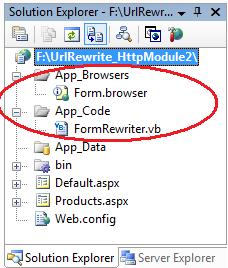
你可在这里查看一个我创建的样例实现,其展示了该如何实现与URL重写协作的表单控件适配器(Form Control Adapter) 。
参考:http://weblogs.asp.net/scottgu/archive/2007/02/26/tip-trick-url-rewriting-with-asp-net.aspx
译文:http://blog.joycode.com/scottgu/archive/2007/03/01/94004.aspx
| 方法 | 信息量大小 | 保存时间 | 应用范围 | 保存位置 |
| Application | 任意大小 | 整个应用程序的生命期 | 所有用户 | 服务器端 |
| Session | 小量、简单的数据 | 用户活动时间+一段延迟时间(一般为20分钟) | 单个用户 | 服务器端 |
| Cookie | 小量、简单的数据 | 可以根据需要设定 | 单个用户 | 客户端 |
| Viewstate | 小量、简单的数据 | 一个Web页面的生命期 | 单个用户 | 客户端 |
| Cache | 任意大小 | 可以根据需要设定 | 所有用户 | 服务器端 |
| 隐藏域 | 小量、简单的数据 | 一个Web页面的生命期 | 单个用户 | 客户端 |
| 查询字符串 | 小量、简单的数据 | 直到下次页面的跳转请求 | 单个用户 | 客户端 |
| Web.Config文件 | 不变、或极少改奕的小量数据 | 直到配置文件被更新 | 所有用户 | 服务器端 |