



可以创建实现模板的用户控件,这是 ASP.NET 的一项功能,它允许将控件数据与其表示形式相分离。模板化控件不提供用户界面。编写它则是为了实现一个命名容器以及包含属性和方法可由宿主页访问的类。
用户控件的用户界面由页面开发人员在设计时提供。开发人员创建由用户控件定义的类型模板,然后可以向模板添加控件和标记。
创建模板用户控件
-
在 .ascx 文件中,添加要在其中显示模板的 ASP.NET PlaceHolder 控件。
-
在用户控件的代码中,实现 ITemplate 类型的属性。
-
将实现 INamingContainer 接口的服务器控件类定义为要在其中创建模板实例的容器。此容器叫做模板的命名容器。
.gif "说明") 说明:
说明:此控件实质上成了用户控件的嵌套类,但这不是必需的。
-
将 TemplateContainerAttribute 应用于实现 ITemplate 的属性 (property),并将模板命名容器的类型作为参数传递给属性 (attribute) 的构造函数。
-
在控件的 Init 方法中,将以下步骤重复一次或多次:
-
创建命名容器类的一个实例。
-
在命名容器中创建该模板的一个实例。
-
将命名容器实例添加到 PlaceHolder 服务器控件的 Controls 属性。
说明:从使用用户控件的页面的角度来看,模板化用户控件的语法与自定义模板化控件的语法相同。
-
 示例
示例 下面的示例演示一个模板化用户控件和一个包含该控件的页面。该用户控件创建一个可在宿主页上声明为 <MessageTemplate> 的模板。该模板控件还公开两个可由宿主页在模板内访问的属性:Index 和 Message。
第一个示例显示模板化用户控件。第二个示例显示包含该用户控件的页面。
<%@ Control language="VB" ClassName="TemplatedUC" %>
<%@ Import Namespace="System.ComponentModel" %>
<script runat="server" >
 Private m_messageTemplate As ITemplate = Nothing
 <TemplateContainer(GetType(MessageContainer))> _
 <PersistenceMode(PersistenceMode.InnerProperty)> Public Property _
 MessageTemplate() As ITemplate
 Get
 Return m_messageTemplate
 End Get
 Set(ByVal value As ITemplate)
 m_messageTemplate = Value
 End Set
 End Property

 Sub Page_Init()
 If Not (MessageTemplate Is Nothing) Then
 Dim i As Integer
 Dim fruits() As String = _
 {"apple", "orange", "banana", "pineapple"}
 For i = 0 To 3
 Dim container As New MessageContainer(i, fruits(i))
 MessageTemplate.InstantiateIn(container)
 PlaceHolder1.Controls.Add(container)
 Next i
 End If
 End Sub
 Public Class MessageContainer
 Inherits Control
 Implements INamingContainer
 Private m_index As Integer
 Private m_message As String
 Friend Sub New(ByVal i As Integer, ByVal msg As String)
 Me.Index = i
 Me.Message = msg
 End Sub

 Public Property Index() As Integer
 Get
 Return m_index
 End Get
 Set(ByVal value As Integer)
 m_index = value
 End Set
 End Property
 Public Property Message() As String
 Get
 Return m_message
 End Get
 Set(ByVal value As String)
 m_message = value
 End Set
 End Property
 End Class
</script>
<asp:Placeholder runat="server" ID="PlaceHolder1" />
<%@ Control language="C#" ClassName="TemplatedUC" %>
<%@ Import Namespace="System.ComponentModel" %>
<script runat="server">
private ITemplate messageTemplate = null;
[ TemplateContainer(typeof(MessageContainer)) ]
[ PersistenceMode(PersistenceMode.InnerProperty) ]
public ITemplate MessageTemplate {
 get
 {
 return messageTemplate;
 }
 set
 {
 messageTemplate = value;
 }
}
void Page_Init() {
 if (messageTemplate != null) {
 String[] fruits = {"apple", "orange", "banana", "pineapple" };
 for (int i=0; i<4; i++)
 {
 MessageContainer container = new MessageContainer(i, fruits[i]);
 messageTemplate.InstantiateIn(container);
 PlaceHolder1.Controls.Add(container);
 }
 }
}
public class MessageContainer: Control, INamingContainer {
 private int m_index;
 private String m_message;
 internal MessageContainer(int index, String message)
 {
 m_index = index;
 m_message = message;
 }
 public int Index {
 get
 {
 return m_index;
 }
 }
 public String Message
 {
 get
 {
 return m_message;
 }
 }
}
</script>
<asp:Placeholder runat="server" ID="PlaceHolder1" />
<%@ Page Language="VB" %>
<%@ Register TagPrefix="uc" tagname="TemplateTest"
 Src="TemplatedUC.ascx" %>
<!DOCTYPE html PUBLIC "-//W3C//DTD XHTML 1.1//EN"
 "http://www.w3.org/TR/xhtml11/DTD/xhtml11.dtd">
<html >
<script runat="server">
 Sub Page_Load()
 DataBind()
 End Sub
</script>
<head>
<title>Templated User Control Test</title>
</head>
<body>
<h1>Testing Templated User Control</h1>
<form id="Form1" runat="server">
<uc:TemplateTest runat="server">
 <MessageTemplate>
 Index: <asp:Label runat="server" ID="Label1"
 Text='<%# Container.Index %>' />
 <br />
 Message: <asp:Label runat="server" ID="Label2"
 Text='<%# Container.Message %>' />
 <hr />
 </MessageTemplate>
</uc:TemplateTest>
</form>
</body>
</html>
<%@ Page Language="C#" %>
<%@ Register TagPrefix="uc" tagname="TemplateTest"
 Src="TemplatedUC.ascx" %>
<!DOCTYPE html PUBLIC "-//W3C//DTD XHTML 1.1//EN"
 "http://www.w3.org/TR/xhtml11/DTD/xhtml11.dtd">
<html >
<script runat="server">
 protected void Page_Load()
 {
 DataBind();
 }

</script>
<head>
<title>Templated User Control Test</title>
</head>
<body>
<h1>Testing Templated User Control</h1>
<form id="Form1" runat="server">
<uc:TemplateTest runat="server">
 <MessageTemplate>
 Index: <asp:Label runat="server" ID="Label1"
 Text='<%# Container.Index %>' />
 <br />
 Message: <asp:Label runat="server" ID="Label2"
 Text='<%# Container.Message %>' />
 <hr />
 </MessageTemplate>
</uc:TemplateTest>
</form>
</body>
</html>
今年早些时候,我通过blog介绍了 C# 和 VB 语言的一项新的扩充特性"扩展方法"。
扩展方法让开发者可以向已有的 CLR 类型的公共契约中添加新的方法,而不需要子类化或重新编译原有的类型。通过这种做法,可以使很多有用的应用场景成为可能(包括 LINQ)。同时,扩展方法也可以用来非常方便地向代码中添加"语法糖"。
过去几个月,我一直在准备一些很酷的扩展方法的清单,并计划在有空的时候实现它们(不确定何时...但至少我还能从这些想法中获得乐趣)。在上述清单中有两个扩展方法的应用场景,分别是用于为任意 .NET 对象自动生成JSON (JavaScript Object Notation)或 XML 序列化字符串的。
简单场景:ToJSON() 扩展方法
假设我有一个 Person 类定义如下(注意:我使用了 自动属性的新特性来实现):
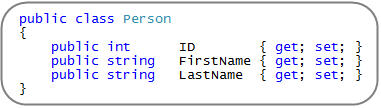
接下来,我就可以初始化一系列 Person 对象的集合,然后只需调用 ToJSON() 扩展方法,就能得到表示该集合内容的 JSON 字符串。如下所示:

这和 .NET 中内建的,Object 类的 ToString() 方法调用方式很相似 —— 只是生成的结果是表示集合内容的 JSON 格式的字符串而已。然后我们就可以在 AJAX 场景的客户端使用它:

注意:点击上图中调试器的放大镜图标,可以打开"文本视图(Text Visualizer)",能更方便的查看 JSON 序列化字符串:
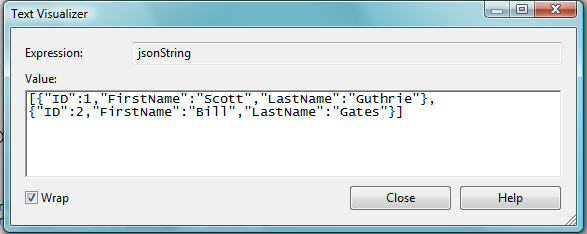
接下来,这个字符串格式在客户端可以用 JavaScript 来实例化为合适的 JavaScript 对象,用于表示我的集合内容(注: ASP.NET AJAX 有一个内建的 JavaScript 库支持这些特性)。
实现 ToJSON 扩展方法
实现一个基本的 ToJSON() 扩展方法很简单。只要使用 System.Web.Script.Serialization 命名空间下的 JavaScriptSerializer 类即可,然后象下面所示的那样定义两个扩展方法。其中一个方法用于对目标对象图(object graph)进行"深"的序列化,而另一个方法则是一个重载的版本,它允许你指定序列化的深度(比如:ToJSON(2) 只序列化 2 个层次的深度)。
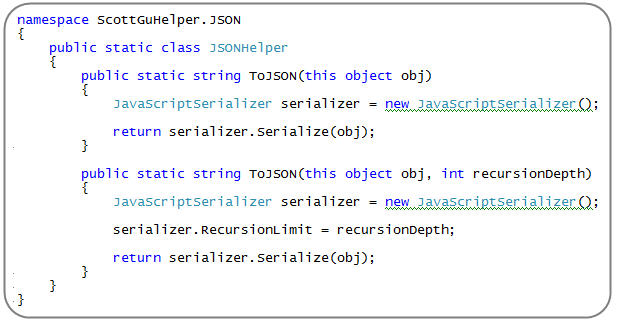
注意,上面的 ToJSON() 扩展方法只是针对 "Object" 类型而定义的——这意味着它可以被用于 .NET 中的任何类型(不限于集合)。也就是说,我们不仅能对上述集合调用 .ToJSON() 方法,还可以对单独的 Person 对象调用 ToJSON() 方法,或者任意其他的 .NET 类型都可以。
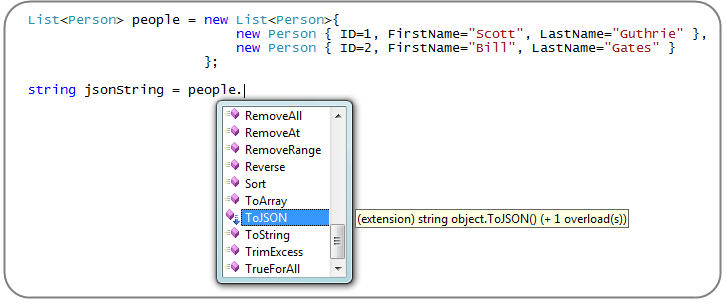
要使用上述扩展方法,只需在程序的顶部添加如下命名空间的引用即可:

然后 VS 2008 就可以为任意对象提供针对这些扩展方法的代码自动完成和编译时支持功能:
注意:除了 JavaScriptSerializer 类之外,.NET 3.5 还包含一个新的new System.Runtime.Serialization.DataContractJsonSerializer class 类 ,你也可以用它来做 JSON 序列化/反序列化的工作。
小结
希望以上的例子能给你一个使用扩展方法来封装功能的示例。下次希望我们一起来看一些好的工具库,用于提供类似有用的扩展方法的功能。
我非常想看到其他关于可复用的扩展方法使用场景的建议(请通过这篇帖子的评论来建议)。然后我们可以琢磨出,如何创建一个好的 CodePlex 项目,来把这些方法捆绑到一个库中以便利用。
希望这篇帖子对你有用,
Scott
SqlConnection con = new SqlConnection(ConfigurationManager.ConnectionStrings["swosConnectionString"].ToString());
SqlCommand cmd = new SqlCommand("", con);
cmd.CommandText = "SELECT [ID], [tag] FROM [XsdnTag] where [abc]=@abc order by [order] desc";
//cmd.Parameters.AddWithValue("@ID", id);
//cmd.Parameters.Add("@abc", SqlDbType.NVarChar);
//cmd.Parameters["@abc"].Value = "sssss";
SqlParameter pText=new SqlParameter("@Text",mytext);
cmd.Parameters.Add(pText);
try
{
con.Open();
cmd.ExecuteNonQuery();
//SqlDataReader dr = cmd.ExecuteReader();
//while (dr.Read())
//{
// ddddd = dr["ID"].ToString();
//}
//dr.Close();
}
catch (Exception ex)
{
zErrorLog.catchError(Request.Url.ToString(), ex.Message);
}
finally
{
con.Close();
}
OleDbConnection con = new OleDbConnection(ZhijiangSystem.Properties.Settings.Default["localDBConnectionString"].ToString());
OleDbConnection con = new OleDbConnection(ConfigurationManager.ConnectionStrings["ConnectionStringXSSP"].ToString());
OleDbCommand cmd = new OleDbCommand("", con);
try
{
con.Open();
cmd.CommandText = "update [BlogCatalog] set [order] = ? where [ID] = ?";
cmd.Parameters.AddWithValue("@ID", id);
cmd.Parameters.Add("@aaaaa", OleDbType);
cmd.Parameters["@aaaaa"].Value = aaaaa;
cmd.ExecuteNonQuery();
//OleDbDataReader dr = cmd.ExecuteReader();
//while (dr.Read())
//{
// ddddd = dr["ID"].ToString();
//}
//dr.Close();
DataSet customersSet = new DataSet();
DataTable customersTable = null;
OleDbDataAdapter sda = new OleDbDataAdapter("SELECT * FROM Customers", "Data Source=localhost;Integrated Security=SSPI;Initial Catalog=Northwind;");
sda.Fill(customersTable);
customersTable = customersSet.Tables[0];
}
catch (Exception ex)
{
zErrorLog.catchError(Request.Url.ToString(), ex.Message);
}
finally
{
con.Close();
zCountQueries.plusOnce();
}
===========sql2005===========
SET ANSI_NULLS ON
GO
SET QUOTED_IDENTIFIER ON
GO
ALTER PROCEDURE [dbo].[sp_Get_NewsList]--返回新闻列表
(@NodeID int=null,
@pageIndex int=null,
@pageSize int)
AS
BEGIN
with Tmptable as (
SELECT ROW_NUMBER() OVER (ORDER BY IfPeak desc, ModifyDate desc) AS RowNo,NewsID,Title,AddDate,IfLink,HtmlNews,HomePic from T_News where NodeID=@NodeID )
SELECT * FROM Tmptable where RowNo between (@pageIndex-1)*@pageSize+1 and (@pageIndex-1)*@pageSize+@pageSize
END
===========sql2000===========
ALTER PROCEDURE [dbo].[sp_Get_NewsList]--返回新闻列表
(@NodeID int=null,
@pageIndex int=null,
@pageSize int)
AS
set nocount on
BEGIN
declare @indextable table(id int identity(1,1),nid int)
declare @PageLowerBound int
declare @PageUpperBound int
set @PageLowerBound=(@pageIndex-1)*@pageSize
set @PageUpperBound=@PageLowerBound+@pageSize
set rowcount @PageUpperBound
insert into @indextable(nid)
select NewsID from T_News where NodeID=@NodeID ORDER BY IfPeak desc, ModifyDate desc
select NewsID,Title,AddDate,IfLink,HtmlNews,HomePic from T_News O,@indextable t
where O.NewsID=t.nid and t.id
between @PageLowerBound+1 and @PageUpperBound order by t.id
END
set nocount off
下载地址 ftp://xuexi:xuexi123456@218.246.23.98/VS2005.rar
新增地址 ftp://thc123_net:thc123_com@220.113.41.144/thcvs2005.rar
附上天轰穿主页:

设置目录权限
network service
SQL Server 外围应用配置器:
-服务和连接的外围应用配置器
-远程连接
-同时使用 ICP/IP 和 named pipes
SQL Server Management Studio:
-Windows 身份验证 登录
-本机服务器右键属性
-安全性 改验证模式
-登录名 可用sa,可新建 状态 设置登录启用
本文所述部署 DotNetTextBox 的版本为:免费开源版 3.4.1,仅供参考!
引用dll:
ActiproSoftware.CodeHighlighter.Net20.dllActiproSoftware.Shared.Net20.dll
CodeHighlighterTest.dll
DotNetTextBox.dll
EnvDTE.dll
Interop.Word.dll
Microsoft.Vbe.Interop.dll
Office.dll
Word_dntb.dll
调用方法:
1.直接在ASPX页面引用控件的话,请将 DotNetTextBox.dll 复制到页面所在项目的 bin 目录下,并在web.config 的 pages -> controls 节点加:
<add tagPrefix="DNTB" namespace="DotNetTextBox" assembly="DotNetTextBox"/>在需要加入控件的地方添加:
<DNTB:WebEditor ID="WebEditor1" runat="server" systemFolder="system_dntb/" Skin="skin/XP/" PathType="AbsoluteRoot" />上面设置了我默认的属性。
2.将默认属性写在 appSettings 里,可以不做。
3.添加控件到VS的工具箱,可以不做。
4.将 system_dntb 目录拷贝到所在项目里。
5.将控件 bin 目录里的 ActiproSoftware.CodeHighlighter.Net20.dll、ActiproSoftware.Shared.Net20.dll、CodeHighlighterTest.dll 拷贝到项目 BIN 目录里(如果不需要代码高亮功能,删除 system_dntb 目录里的 PasteCode.aspx 和 PasteCode.aspx.cs 页面就可以不拷贝这三个 DLL 文件)
6.web.config 中设置 codeHighlighter
configSections中加入:
<section name="codeHighlighter" requirePermission="false" type="ActiproSoftware.CodeHighlighter.CodeHighlighterConfigurationSectionHandler, ActiproSoftware.CodeHighlighter.Net20"/>加入以下代码为二级节点:
<codeHighlighter>
<cache languageTimeout="3"/>
<keywordLinking enabled="true" target="_blank" defaultKeywordCollectionKey="ActiproKeywords">
<keywordCollection key="ActiproKeywords">
<explicitKeyword tokenKey="IdentifierToken" patternValue="Actipro" url="http://www.actiprosoftware.com" caseSensitive="false"/>
<explicitKeyword tokenKey="IdentifierToken" patternValue="CodeHighlighter" url="http://www.codehighlighter.com" caseSensitive="false"/>
</keywordCollection>
</keywordLinking>
<languages>
<language key="Assembly" definitionPath="~/system_dntb/Lexers/ActiproSoftware.Assembly.xml"/>
<language key="BatchFile" definitionPath="~/system_dntb/Lexers/ActiproSoftware.BatchFile.xml"/>
<language key="C#" definitionPath="~/system_dntb/Lexers/ActiproSoftware.CSharp.xml"/>
<language key="CSS" definitionPath="~/system_dntb/Lexers/ActiproSoftware.CSS.xml"/>
<language key="HTML" definitionPath="~/system_dntb/Lexers/ActiproSoftware.HTML.xml"/>
<language key="INIFile" definitionPath="~/system_dntb/Lexers/ActiproSoftware.INIFile.xml"/>
<language key="Java" definitionPath="~/system_dntb/Lexers/ActiproSoftware.Java.xml"/>
<language key="JScript" definitionPath="~/system_dntb/Lexers/ActiproSoftware.JScript.xml"/>
<language key="Lua" definitionPath="~/system_dntb/Lexers/ActiproSoftware.Lua.xml"/>
<language key="MSIL" definitionPath="~/system_dntb/Lexers/ActiproSoftware.MSIL.xml"/>
<language key="Pascal" definitionPath="~/system_dntb/Lexers/ActiproSoftware.Pascal.xml"/>
<language key="Perl" definitionPath="~/system_dntb/Lexers/ActiproSoftware.Perl.xml"/>
<language key="PHP" definitionPath="~/system_dntb/Lexers/ActiproSoftware.PHP.xml"/>
<language key="PowerShell" definitionPath="~/system_dntb/Lexers/ActiproSoftware.PowerShell.xml"/>
<language key="Python" definitionPath="~/system_dntb/Lexers/ActiproSoftware.Python.xml"/>
<language key="SQL" definitionPath="~/system_dntb/Lexers/ActiproSoftware.SQL.xml"/>
<language key="VB.NET" definitionPath="~/system_dntb/Lexers/ActiproSoftware.VBDotNet.xml"/>
<language key="VBScript" definitionPath="~/system_dntb/Lexers/ActiproSoftware.VBScript.xml"/>
<language key="XAML" definitionPath="~/system_dntb/Lexers/ActiproSoftware.XAML.xml"/>
<language key="XML" definitionPath="~/system_dntb/Lexers/ActiproSoftware.XML.xml"/>
</languages>
<lineNumberMargin foreColor="Teal" paddingCharacter=" " visible="true"/>
<outlining enabled="true" imagesPath="~/system_dntb/OutliningIndicators/"/>
<spacesInTabs count="4"/>
</codeHighlighter>
7.在使用的页面需要设置page: ValidateRequest="false" EnableEventValidation="false"
8.搜索 id 为 OutliningEnabledCheckBox 的单选框,更改默认 Checked="true",显示行号也可以改为选中,不过这样不方便读者复制代码使用。
另外提醒一点,DotNetTextBox 在 UpdatePanel 中使用时,回传后会丢失内容,使用时注意。
下载最新的免费CodeHighlighter组件 http://www.CodeHighlighter.com
1。确保web.config中的languages节点的.xml文件路径正确。
2。可以在insertCode.aspx更改编辑的默认设置,如checkbox的check等。(或在项目中搜索相关代码)
DotNetTextBox 已集成CodeHighlighter,我的修改如下:
SyntaxHighlighter is here to help a developer/coder to post code snippets online with ease and have it look pretty. It's 100% Java Script based and it doesn't care what you have on your server.
