



安装ASP.NET AJAX
安装Toolkit:
下载解压AjaxControlToolkit.zip移至
C:\Program Files\Microsoft ASP.NET\ASP.NET 2.0 AJAX Extensions\AjaxControlToolkit
安装模板C:\Program Files\Microsoft ASP.NET\ASP.NET 2.0 AJAX Extensions\AjaxControlToolkit\AjaxControlExtender\AjaxControlExtender.vsi
若安装失败,手工建立以下文件夹:
\My Documents\Visual Studio 2005\Templates\ItemTemplates\Visual C#
\My Documents\Visual Studio 2005\Templates\ItemTemplates\Visual Basic
\My Documents\Visual Studio 2005\Templates\ProjectTemplates\Visual C#
\My Documents\Visual Studio 2005\Templates\ProjectTemplates\Visual Basic
把SampleWebSite\Bin下的AjaxControlToolkit.dll和AjaxControlToolkit.pdb
复制至Binaries下。
打开VS,添加选项卡AjaxControlToolkit,添加项浏览至Binaries\AjaxControlToolkit.dll

CatalogEdit.aspx
<asp:ListBox ID="ListBox1" runat="server" DataSourceID="SqlDataSource1" DataTextField="catalog"
DataValueField="ID" Rows="10"></asp:ListBox>
<asp:LinkButton ID="LinkButton_up" runat="server" OnClick="LinkButton_up_Click">上移</asp:LinkButton>
<asp:LinkButton ID="LinkButton_down" runat="server" OnClick="LinkButton_down_Click">下移</asp:LinkButton>
<asp:LinkButton ID="LinkButton_del" runat="server" OnClick="LinkButton_del_Click">删除</asp:LinkButton>
<asp:Label ID="Label_alert" runat="server" ForeColor="Red" Text="Label"></asp:Label><br />
<asp:TextBox ID="TextBox_newCatalog" runat="server"></asp:TextBox>
<asp:LinkButton ID="LinkButton_add" runat="server" OnClick="LinkButton_add_Click">新增</asp:LinkButton>
<asp:LinkButton ID="LinkButton_edit" runat="server" OnClick="LinkButton_edit_Click">修改</asp:LinkButton>
<asp:SqlDataSource ID="SqlDataSource1" runat="server" ConnectionString="<%$ ConnectionStrings:ConnectionStringLink %>"
DeleteCommand="DELETE FROM [xLinkCategory] WHERE [ID] = ?" InsertCommand="INSERT INTO [xLinkCategory] ([username],[catalog],[order]) VALUES (?,?,0)"
ProviderName="<%$ ConnectionStrings:ConnectionStringLink.ProviderName %>"
SelectCommand="SELECT [ID], [catalog] FROM [xLinkCategory] WHERE ([username] = ?) ORDER BY [order],[ID] desc"
UpdateCommand="UPDATE [xLinkCategory] SET [catalog] = ? WHERE [ID] = ?">
<DeleteParameters>
<asp:Parameter Name="ID" Type="Int32" />
</DeleteParameters>
<UpdateParameters>
<asp:Parameter Name="catalog" Type="String" />
<asp:Parameter Name="ID" Type="Int32" />
</UpdateParameters>
<SelectParameters>
<asp:SessionParameter Name="username" SessionField="username" Type="String" />
</SelectParameters>
<InsertParameters>
<asp:SessionParameter Name="username" SessionField="username" Type="String" />
<asp:Parameter Name="catalog" Type="String" />
</InsertParameters>
</asp:SqlDataSource>
CatalogEdit.aspx.cs
/**//// <summary>
/// 上移
/// </summary>
/// <param name="sender"></param>
/// <param name="e"></param>
protected void LinkButton_up_Click(object sender, EventArgs e)
{
if (ListBox1.SelectedItem != null && ListBox1.SelectedIndex > 0)
{
string tempValue = ListBox1.SelectedValue;
string tempText = ListBox1.SelectedItem.Text;
int index = ListBox1.SelectedIndex;

ListBox1.SelectedItem.Value = ListBox1.Items[index - 1].Value;
ListBox1.SelectedItem.Text = ListBox1.Items[index - 1].Text;
ListBox1.Items[index - 1].Value = tempValue;
ListBox1.Items[index - 1].Text = tempText;

ListBox1.SelectedIndex--;

operateDB_move();
}
}
/**//// <summary>
/// 下移
/// </summary>
/// <param name="sender"></param>
/// <param name="e"></param>
protected void LinkButton_down_Click(object sender, EventArgs e)
{
if (ListBox1.SelectedItem != null && ListBox1.SelectedIndex < ListBox1.Items.Count - 1)
{
string tempValue = ListBox1.SelectedValue;
string tempText = ListBox1.SelectedItem.Text;
int index = ListBox1.SelectedIndex;

ListBox1.SelectedItem.Value = ListBox1.Items[index + 1].Value;
ListBox1.SelectedItem.Text = ListBox1.Items[index + 1].Text;
ListBox1.Items[index + 1].Value = tempValue;
ListBox1.Items[index + 1].Text = tempText;

ListBox1.SelectedIndex++;

operateDB_move();
}
}
/**//// <summary>
/// 添加
/// </summary>
/// <param name="sender"></param>
/// <param name="e"></param>
protected void LinkButton_add_Click(object sender, EventArgs e)
{
if (TextBox_newCatalog.Text != "")
{
//检查同名
bool goon = true;
foreach (ListItem li in ListBox1.Items)
{
if (li.Text == TextBox_newCatalog.Text)
{
goon = false;
}
}

if (goon)
{
//操作
SqlDataSource1.InsertParameters["catalog"].DefaultValue = TextBox_newCatalog.Text;
SqlDataSource1.Insert();

//设置selected
if (ListBox1.Items.Count > 0)
{
ListBox1.SelectedIndex = 0;
}
}
else
{
Label_alert.Text = "已存在";
}
}
}
/**//// <summary>
/// 修改
/// </summary>
/// <param name="sender"></param>
/// <param name="e"></param>
protected void LinkButton_edit_Click(object sender, EventArgs e)
{
if (TextBox_newCatalog.Text != "" && ListBox1.SelectedItem != null)
{
int index = ListBox1.SelectedIndex;

//检查同名
bool goon = true;
foreach (ListItem li in ListBox1.Items)
{
if (li.Text == TextBox_newCatalog.Text)
{
goon = false;
}
}

if (goon)
{
//操作
SqlDataSource1.UpdateParameters["catalog"].DefaultValue = TextBox_newCatalog.Text;
SqlDataSource1.UpdateParameters["ID"].DefaultValue = ListBox1.SelectedItem.Value;
SqlDataSource1.Update();

//设置selected
ListBox1.SelectedIndex = index;
}
else
{
Label_alert.Text = "已存在";
}
}
}
/**//// <summary>
/// 删除
/// </summary>
/// <param name="sender"></param>
/// <param name="e"></param>
protected void LinkButton_del_Click(object sender, EventArgs e)
{
if (ListBox1.SelectedItem != null)
{
int index = ListBox1.SelectedIndex;
int count = ListBox1.Items.Count;

//检查该 Catalog 下是否有 Link
bool goon = true;
goon = !checkSubLink(ListBox1.SelectedValue); //下有 Link 则返回真,注意前面有个"!",有则不继续

if (goon)
{
//操作
SqlDataSource1.DeleteParameters["ID"].DefaultValue = ListBox1.SelectedItem.Value;
SqlDataSource1.Delete();

//设置selected
if (index < count - 1) //删的不是最末项
{
ListBox1.SelectedIndex = index;
}
if (index == count - 1 && index != 0) //删的是最末项,并且不是最首项
{
ListBox1.SelectedIndex = index - 1;
}
if (index == count - 1 && index == 0) //删的是最末项,并且是最首项
{
//不设索引
}
}
else
{
Label_alert.Text = "该节点下面存在Link(s),请删除后再删除该节点!";
}
}
}
推荐参考更新的文章:.NET 5 / ASP.NET Core / ASP.NET Frameworks 从纯真 IP 数据库(QQWry.Dat)中查询 IP 归属地
纯真IP数据库官方下载地址:http://www.cz88.net/
之前我写过将 QQWry.Dat 转为 Access 格式后,在 ASP.NET 中通过简单算法去查询,缺点是 IP 数据库体积变大。现在有了更简单的方法:
1,下载 IPLocation.dll (备用地址),将它放在网站的 Bin 目录下,将 QQWry.Dat 放在网站的任何位置(一般为 App_Data 目录)。刷新解决方案管理器。
2,在使用的页面加入引用
using IPLocation;
或者在 web.config 文件中,节点 pages -> controls 添加
<add tagPrefix="IPLocation" namespace="IPLocation" assembly="IPLocation"/>
3,调用方法:
Label1.Text = IPLocation.IPLocation.IPLocate(Server.MapPath("~/App_Data/QQWry.Dat"), TextBox1.Text.Trim());
方法 IPLocate() 参数一为 QQWry.Dat 路径,参数二为 IP 地址,返回 IP 归属地。
够简单吧,补充一点,在 VS2003 需要在项目中添加 IPLocation.dll 的引用。
需要 URLRewriter.dll,它可以在微软官方下载到:取出Bin里面的文件
接下来配置 Web.Config 文件:
在 <configSections> 节点下添加:
<section name="RewriterConfig" type="URLRewriter.Config.RewriterConfigSerializerSectionHandler, URLRewriter" />
在 <configuration> 节点下添加:
<RewriterConfig>
<Rules>
<RewriterRule>
<!--测试-->
<LookFor>~/(\d{2})/(\d{2})\.aspx</LookFor>
<SendTo>~/Default.aspx?m=$1&d=$2</SendTo>
</RewriterRule>
</Rules>
</RewriterConfig>
在 <httpHandlers> 节点下添加:
<add verb="*" path="*.aspx" type="URLRewriter.RewriterFactoryHandler, URLRewriter" />
完成以上步骤即可以实现URL重写的。但是它只能实现 ~/11/11.aspx 到 ~/Default.aspx?m=11&d=11 的重写,如果要实现 ~/11/11.html 到 ~/Default.aspx?m=11&d=11 的重写,那么需要通过设置 IIS 来实现 .html 文件的筛选。(适合 IIS5 IIS6,在 IIS7 中不用这么麻烦,具体见本文末尾的链接,scott 的文章)
进入:Internet 信息管理服务 -》网站属性 -》主目录 -》配置 -》映射 -》添加 -》把扩展名 .html 映射到 C:\WINDOWS\Microsoft.NET\Framework\v2.0.50727\aspnet_isapi.dll。
然后在 <httpHandlers> 节点中,把 *.html 也交给 URLRewriter 处理就行了。
OK,试试看,访问 ~/11/11.html 确实是 ~/Default.aspx?m=11&d=11 的内容,可是只要 postback 一下,地址栏又显示实际路径了。只要在你的/app_browsers文件夹里添加一个.browser文件,注册使用一个控件适配类即可输出新的action属性。
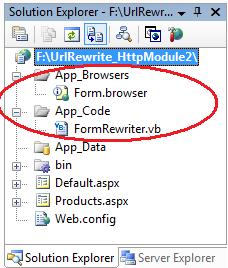
你可在这里查看一个我创建的样例实现,其展示了该如何实现与URL重写协作的表单控件适配器(Form Control Adapter) 。
参考:http://weblogs.asp.net/scottgu/archive/2007/02/26/tip-trick-url-rewriting-with-asp-net.aspx
译文:http://blog.joycode.com/scottgu/archive/2007/03/01/94004.aspx
许多情况下,asp.net 在 Page_Load 事件中需要动态生成控件,这对于一些新手,包括我在内,会因为回传控件消失,或重复叠加控件等原因搞得头大,经过我翻阅资料和自己的实践,以博客评论页为例,把整个框架写在下面,仅供参考。
<asp:Panel>
<asp:Panel 记录索引 3 >
<asp:Label 昵称 /> <asp:Label 时间 /> <asp:LinkButton 支持按钮_3 /> <asp:LinkButton 删除按钮_3 /> 1楼
</asp:Panel>
<asp:Panel 记录索引 5 >
<asp:Label 昵称 /> <asp:Label 时间 /> <asp:LinkButton 支持按钮_5 /> <asp:LinkButton 删除按钮_5 /> 2楼
</asp:Panel>
</asp:Panel>
记录索引是指数据库中的自动编号。
支持按钮触发事件 LinkButton_support_Click(object sender, EventArgs e)
删除按钮触发事件 LinkButton_del_Click(object sender, EventArgs e)
所有子 Panel 和内部的所有控件都是在 Page_Load 事件中动态创建的,并且不能被嵌套在 if(!IsPostBack)
“点支持累计点击数”和“点删除删除一条记录”都是需要操作数据库的,我以前的做法是操作完数据库后 .Clear() 掉所有控件,再重新生成一次,这样既浪费服务器资源,又容易出现界面上的混乱,譬如显示了两遍该文章的评论。
其实上面代码中 Panel 套 Panel 的好处就是可以根据索引直接删除相应控件,然后直接在页面呈现,而省去上述烦恼。至于累计支持数就更简单了,下面的代码可以轻松解决问题:
string n = ((Label)Panel_commentLists.FindControl("Label_against_" + id)).Text;
n = (Convert.ToInt32(n) + 1).ToString();
((Label)Panel_commentLists.FindControl("Label_against_" + id)).Text = n;
如果有修改和添加评论操作,同样道理,不要重复地全部 .Controls.Add 一次。为了添加时追加一个子 Panel 方便,建议在 Page_Load 的地方传参使用方法来做。
补充:在现在的开发中,我更喜欢用动态生成TableRow,TableCell来操作。